 EN
ENWhat Are Some Tips for Amazon Creator Connections? A Complete Hands-On Guide for 2026!

Many sellers are probably familiar with Amazon Creator Connections, as it has been around for a long time. However, many are still taking a wait-and-see approach and do not know how to get started. In particular, after signing up, quite a few sellers encounter problems such as influencers taking free samples without delivering, poor returns on investment, and not knowing how to review performance data.


The following Amazon Creator Connections guide contains a range of tips covering the entire process, from understanding the program to practical implementation and performance reviews. Both beginners and experienced sellers can learn how to use Amazon Creator Connections effectively!


🎁🎁Efficient operating tool for Amazon Creator Connections:Use it for 0 yuan and receive 3 ten thousand orders


One. What Exactly Is Amazon Creator Connections?


Amazon Creator Connections (ACC for short) is an official influencer marketing tool launched by Amazon for brand sellers. Sellers publish campaigns and set commissions, while creators participate proactively and promote your products by posting content on social media or within Amazon.


CPS means paying per sale: no orders, no payment.


1.1 How Does Amazon Creator Connections Differ from Traditional Off-Amazon Promotion?

| Dimension | Traditional Off-Amazon Promotion | Creator Connections |
| Payment Model | A fixed placement fee is payable regardless of whether any orders are generated | CPS performance-based payment: commissions are paid only when sales are made |
| Traffic Sources | You find influencers, negotiate prices, and sign contracts | Influencers approach you proactively |
| Communication Costs | Contact people individually across platforms | One-stop management through the dashboard + direct messaging |
| Content Retention | Content may be removed after the collaboration ends | Content stays online for long-term exposure |
| Risk Control | Upfront payment with uncertain results | Controllable commissions; no commissions on returned orders |
To sum it up in a sentence, traditional off-Amazon promotion is "pay first, get orders later," while Creator Connections is "get orders first, pay later."
1.2 Who Are the "Creators" in Amazon Creator Connections?
It connects to a global pool of creators from Amazon Associates + the Amazon Influencer Program:
| Type | Platform | Characteristics |
| Video Creators | TikTok / YouTube / IG Reels | Strong follower engagement and visual impact |
| Bloggers/Publishers | Blogs / Media Websites | Long-tail SEO traffic and long-lasting content |
| Deal Site Operators | Slickdeals / Kinja Deals | Precisely target and convert price-sensitive users |
| Podcasters | Spotify / Apple Podcasts | Highly engaged niche audiences with strong trust |
| Community Operators | Facebook Groups | Owned-audience traffic with high conversion rates |
1.3 Eligibility Requirements for Amazon Creator Connections
| Condition | Requirement |
| Brand Qualifications | Complete Brand Registry |
| Commission Rate | ≥ 10% |
| Minimum Budget | ≥ $5,000 |
| Advertising Account | United States, China, or Hong Kong, China marketplace |
| Campaign Duration | 30-365 days |
Since its upgrade in 2025, Amazon Creator Connections has received further upgrades,and now allows you to batch-add 1200 ASINs with a single click, automatically monitor inventory and issue alerts, and gain multidimensional cross-border exposure by distributing content with Amazon-specific tracking links to TikTok/IG (external orders account for 15%-25%, with an extremely high repeat purchase rate), so Amazon Creator Connections is indeed one of the good options currently available to sellers for promotion and marketing.
Two. A Complete Guide and Practical Tips for Amazon Creator Connections
Drawing on the hands-on experience of many Amazon sellers, we will now provide a complete guide to getting Amazon Creator Connections up and running from 0-1.
2.1 Launch an Amazon Creator Connections Campaign in Four Steps
Navigation path: Menu > Advertising > Creator Connections > Amazon Creator Connections
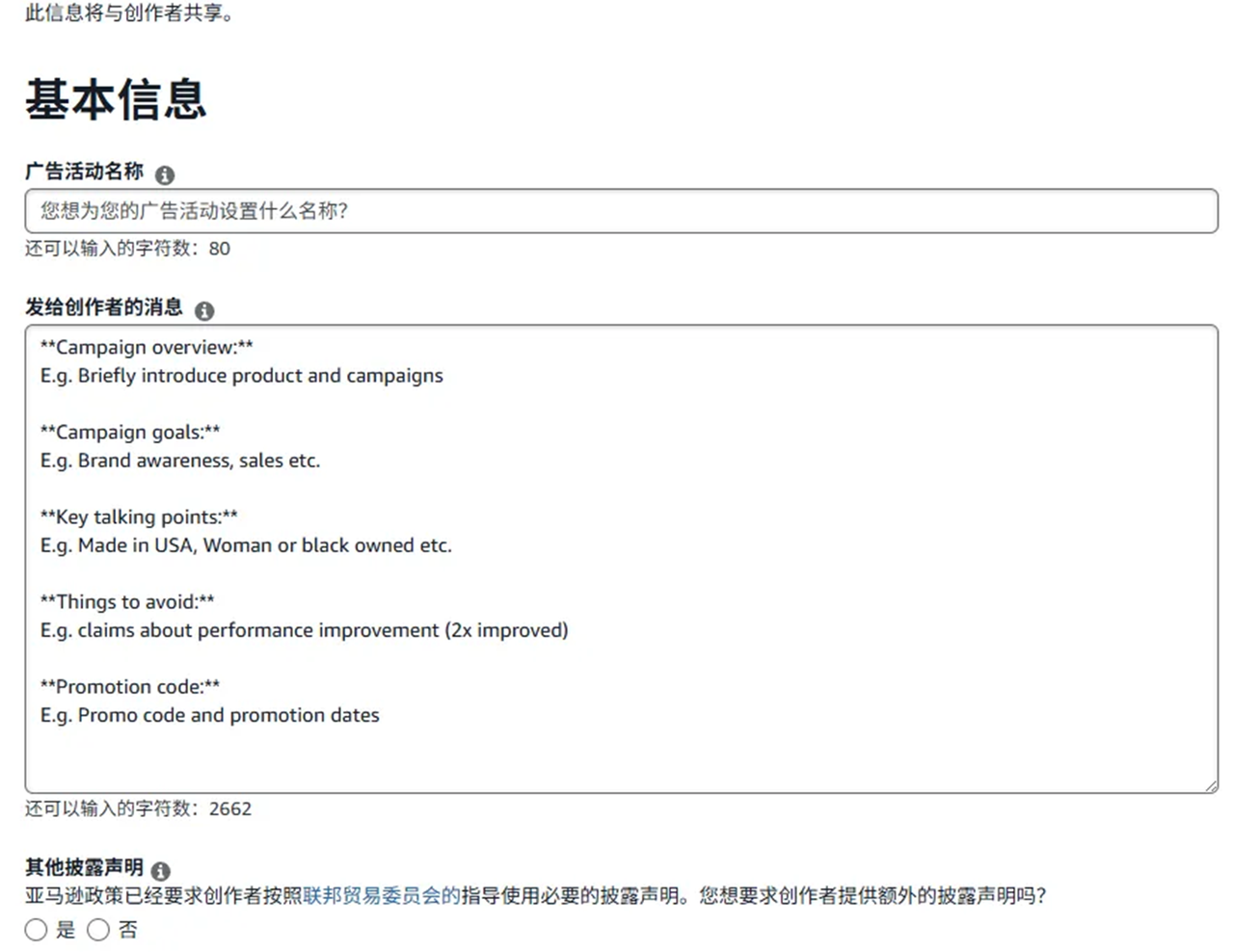
Step One: Create a Campaign
Click “Creator Connections” to open the “Amazon Creator Connections” page. Sellers will see one corresponding option for each brand they have registered.
- Create a request:Click to open the campaign creation page
- View requests:Once the campaign has been created, click to view it
- Fill in the campaign details (all content must be in English):
| Required Fields | Requirements | Tips for Completing the Fields |
| Campaign name | ≤ 80 characters | Include the commission in the title to make it more appealing to influencers! For example: Brand Wallet 25% Commission |
| Commission rate | ≥ 10% | For beginners, 20%-30% is recommended. Higher commission = higher acceptance rate |
| Budget | ≥ $5,000 | Set according to your profit margin |
| Campaign market | 30-365 days | 60-90 days recommended |
| Select ASINs | Up to 1200 | Choose products with ratings and sales |
Step Two: Wait for Creators to Join
Creators in Amazon Creator Connections will seek out sellers themselves, so you do not need to find them yourself. Click the View Requests page to see a list of interested influencers.
Step Three: Communication and Sample Management
Influencers interested in your products will proactively send messages requesting samples, including their Amazon influencer accounts and social media links, and even their addresses. Sellers then need to assess these Amazon creators’ accounts before deciding whether to send samples.
Step Four: Data Tracking and Settlement
In Amazon’s seller interface, you can view spending, sales revenue, order volume, and clicks in real time. Commissions are calculated based on the actual transaction price, and returns are excluded.
2.2 Tips for Amazon Creator Connections
Earlier, we explained how to create a creator campaign in Amazon’s seller interface. However, if sellers want to achieve their expected results, here are some additional tips for reference:
(1) Three Ways to Set Commissions for Amazon Creator Connections
Assume a seller has 30% of budget flexibility
| Strategy | Commission | Discount | Suitable Scenarios |
| A: Allocate Everything to Influencers | 30% | None | Maximize the number of participating influencers |
| B: Combined Approach | 20% | 10% | Balance acceptance + conversion |
| C: Heavy Discounts | 10% | 20% | Increase conversion rates, but with low acceptance |
(2) Should You Send Samples to Creators?
Whether to send samples also requires a strategy, because Amazon does not allow you to report people who take samples without providing anything in return, and there are some pitfalls to avoid. Limit the number of samples sent for each campaign—for example, send only 5 samples. Prioritize creators ranked in the Top 5 by follower count and high-quality creators with Amazon’s certified “Top Creator” star badge. Also require them to post on more than 3 platforms and request video usage rights. Sellers can later upload good videos to their own product detail pages to reuse the content.
(3) Which Products Are Suitable for Amazon Creator Connections?
| ✅Suitable | ❌ Less Suitable |
| Products with an existing sales history and ratings | New products with 0 reviews |
| Products with strong visual demonstration potential | Products requiring complex installation or hands-on experience |
| Everyday consumer goods / bestselling product categories | Extremely niche categories |
| Profit margin ≥ 30% | Extremely thin profit margins |
2.3 How Should Beginners Get Started with Amazon Creator Connections?
- Step 1:Select products → Choose products with ratings and sales
- Step 2:Create a campaign → Set commission at 20%-30%, with no discount
- Step 3:Wait for creators to join → Allow 1-2 weeks to build up influencer participation
- Step 4:Send samples selectively → Top Creator + Top 5 by follower count, 5 units per campaign
- Step 5:Track data → Review results after 7-14 days
- Step 6:Optimize and iterate → Promote strong videos with paid traffic and build lasting relationships with strong creators
III. How Can Amazon Sellers Efficiently Manage the Creator Program? A Practical Saihu ERP Tutorial and Feature Highlights
We have covered how the Amazon Creator Program works, practical tips, and the six-step path for beginners.
However, once they put it into practice, many sellers encounter a practical problem: data across multiple stores, campaigns, and creators is scattered throughout Amazon Seller Central. To review campaign results across marketplaces and compare creators' sales performance, they have to switch stores repeatedly and compile data manually, making performance reviews inefficient.
At this point, centralized data management becomes essential,Saihu ERP offers a dedicated management module for the Creator Program, bringing data from multiple stores, campaigns, and creators scattered throughout Amazon Seller Central into a single dashboard, helping sellers establish a complete operational cycle of “creating campaigns—managing creators—tracking data”(New users who register now enjoy a 0 entry threshold and 36000 free orders throughout the year—don't miss out)!
Saihu ERP turns this program into a trackable, analyzable management tool, focusing on two key use cases:
- Multi-store tracking:View relevant campaigns across all marketplaces in one place without frequently switching stores;
- Multidimensional analysis:Provides visual charts across three dimensions: advertising campaigns, ASINs, and creators.
3.1 Practical Tutorial: Get Started in Three Steps
Step One: Configure role permissions.Go to [Settings]–[Role Management], find the relevant account role, and edit it to select the page permissions under [Advertising]–[Creator Program] (view, follow, notes, export). Members can then access the module.
Step Two: Enable the extension and synchronize data.Find [Amazon Content Creators] under [Task Center]–[Online Status], enable the task, and select the store marketplaces from which you want to retrieve data. Keep Amazon Seller Central and the Saihu extension logged in within the same browser, and the system will automatically synchronize once a day. Manual synchronization is also supported when real-time data is needed: select multiple store marketplaces to run the task in bulk, or click “Run Now” for an individual store.
For a tutorial on downloading the Saihu Amazon data extension, click to visit the Saihu ERP Help Center
Step Three: Track and Review Performance with a Three-Dimensional Dashboard
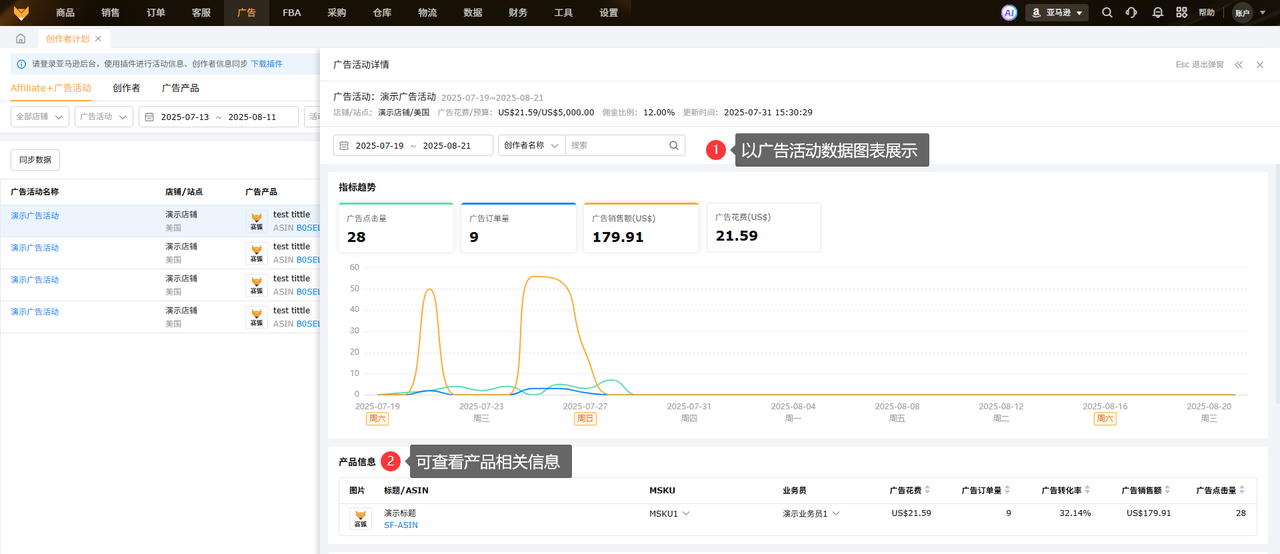
- Affiliate+ advertising campaigns:Quickly filter by store marketplace, advertising campaign, campaign status, and date, with support for custom columns and exports. Click “Analyze” to view campaign details (ad spend, ad orders, ad sales, advertising cost of sales, and trend charts), and drill down into product and creator information.
- Creators:Filter by store, follow status, and date. View creator names, social media, notes, advertising revenue, ad orders, ad conversion rates, advertising commissions, number of collaborations, and content update times. Jump to social media with one click to view submitted content. Click “Number of Collaborations / Number of Content Submissions / Analyze” to view historical advertising campaign collaboration data.
- Advertised products:Displays ad spend, orders, conversion rates, sales, and clicks by ASIN/MSKU, with filtering by store and sales representative. Click “Analyze” to view advertising campaign data associated with the product.
3.2 Feature Highlights at a Glance
| Highlight | Value |
|---|---|
| One-stop multi-store management | View campaign data across all marketplaces in one place without frequently switching stores |
| Three-dimensional visual analysis | Linked charts for advertising campaigns, ASINs, and creators support evidence-based performance reviews |
| Automatic and manual synchronization | The extension synchronizes automatically once a day, with immediate manual execution available in bulk or for individual stores |
| Data definitions aligned with Seller Central | Ad spend remains consistent with Amazon Seller Central, reducing reconciliation discrepancies |
| Traceable creator collaboration records | View historical collaboration campaigns, conversion rates, commissions, and content update times at a glance |
Want to learn more about an efficient solution for the Amazon Creator Program? Click to view the Saihu ERP help documentation
There is no single winning formula for the Amazon Creator Program. The key is to carefully select creators, control sample costs, and continuously review performance after campaigns launch. Many sellers focus only on short-term orders, overlooking the value it brings to their Listings through product discovery and accumulated keyword relevance.
Putting these Amazon Creator Program tips and strategies into practice, together with tools for data tracking, can turn creator traffic into a steady source of incremental growth for your store. If you are also planning to drive traffic through creators, consider following the SOP above to launch a test campaign.
Product link 1:Free cross-border e-commerce ERP registration
Product link 2:Claim 36000 orders for free with no eligibility requirements
Human customer support 3:Free real-time Q&A on cross-border e-commerce ERP
*Disclaimer: Some text, images, and materials on this website are sourced from the internet and are provided solely for discussion and learning purposes. If any content infringes your rights, please contact us by private message, and we will promptly address the issue and remove the content. Without authorization from this website, no organization or individual may reproduce, excerpt, adapt, or otherwise use this website's content.
Source: Original website · Read the original article
Related Learning
From Losses to Profit: How User Experience Helped a DTC Store Achieve an ROI of Over 4 Within 3 Months | Shenzhen Topu Customer Case
A DTC store is not an advertising machine; it is a business built around user experience. I. Introdu…
How to Analyze Competitors on AliExpress? How to Grow a New AliExpress Store
In e-commerce, especially on international B2C platforms like AliExpress, understanding and analyzin…
AliExpress Local Store Shipping Rules? AliExpress Official Website Entry
With the rapid growth of cross-border e-commerce, more and more merchants are choosing to join the A…