 EN
ENTikTok Shop US Black Friday Cyber Monday Dates Finalized for 2026! A Complete Guide to Help Sellers Prepare Efficiently!

Every Q4 is a decisive year-end sales period for cross-border sellers. TikTok Shop US Black Friday and Cyber Monday, the biggest sales event of the year in the US market, can directly determine annual revenue to a certain extent. And here is an important announcement: TikTok Shop US Black Friday and Cyber Monday will run from 11 12 to 12 1; registration is now officially open! The overall rules and traffic schedule for the 2026 sales event have changed compared with previous years. Many sellers prepare year after year but often run into problems, including inventory imbalances, missed warehouse receiving windows, performance issues, and after-sales breakdowns.
Starting from practical seller pain points, this article breaks down the full process—from registration, inventory preparation, and content promotion to risk control—by module, and includes digital tool solutions to help everyone prepare efficiently for this peak season in the US market.
🎁🎁A must-have tool for TikTok Shop US Black Friday and Cyber Monday:Use for 0 yuan and get 3 ten thousand orders
I. Key Rules for the 2026 TikTok Shop US Black Friday and Cyber Monday Sales Event
1.1 TikTok Shop US Black Friday and Cyber Monday Sales Event Timeline
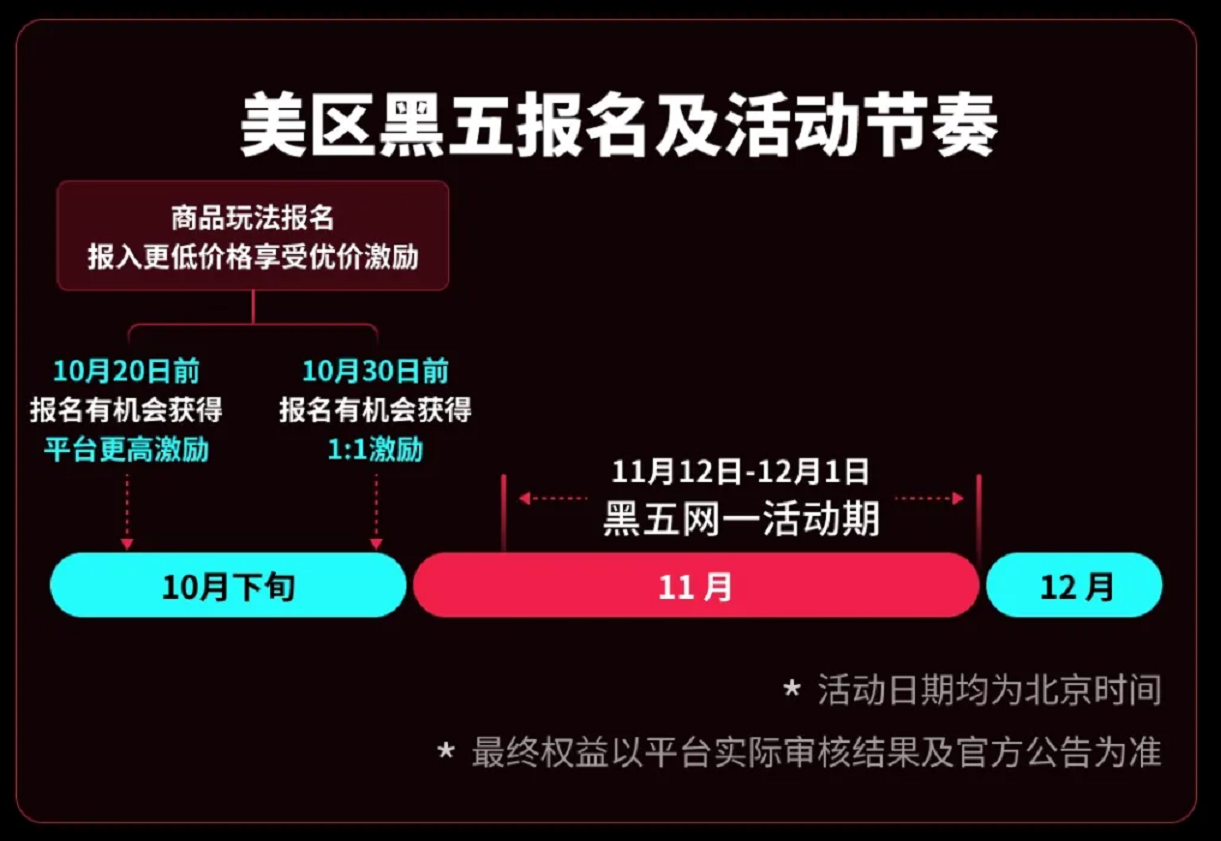 Image source: Official TikTok Shop
According to information released by TikTok Shop, the sales event is divided into three main periods:

- Late 10 to early 11:Registration and preparation period → Registration opens; list coupons and bundles; increase favorites and add-to-cart activity; optimize the store basics; test new products; prepare creator content; and build product ranking signals
- 11 12 to 12 1:Black Friday and Cyber Monday sales peak → The key Black Friday and Cyber Monday window, with platform subsidies and event traffic released in concentrated bursts
- 12:Post-event sales period → Capture unpaid orders and traffic from return-related inventory gaps, while transitioning to Christmas inventory preparation
1.2 What incentives does the platform offer sellers for different US-market sales event formats?
- Format One:Product format → Register by 10 20 for a chance to receive higher platform-funded discount incentives. Register by 10 30; eligible merchants can receive 1: 1 platform-funded discount incentives.
- Platform support:New-seller onboarding and cold-start acceleration can increase product exposure by up to 10 times. Strategic priority products may receive advertising credit incentives; completing registration unlocks additional event labels and exposure.
- Format Two: Livestreaming
- Platform support:Access to leading creators and agency resources, plus exclusive incentives for major livestream events. Merchants participating in livestream auctions can receive commission reductions, as well as 1v1 growth coaching support and extensive exposure resources.
- Format Three: Video/Image-and-Text Content
- Platform support:Creators can enjoy flexible sample shipping, exposure support, affiliate campaign incentives, commission boosts, and exclusive matchmaking services pairing leading creators 1 with 1. Merchants can complete tasks to earn advertising credits, exchange submissions for product subsidies, and purchase AIGC credits at a low price.
- Format Four: Advertising
- Platform support:Merchants can use commission reductions to purchase incremental advertising at costs as low as thirty percent of the original price. For the portion of the advertising fee rate exceeding 15% after commission reduction, platform advertising credits may provide a backstop in accordance with project rules.
- Format Five: Trending Topics
- Platform support:Increase matchmaking efforts with high-quality creators in relevant categories, while also providing hit-video script materials and additional incentives for trending products.
- Format Six: Branding
- Platform support:Merchants who register for priority formats can receive higher resource incentives. The platform also provides personalized support tailored to different users and products to help merchants improve user conversion.
1.3 Registration Requirements and Red Lines for Performance Violations
✅Eligibility requirements:The TikTok Shop US 2026 Black Friday and Cyber Monday event has clearly defined eligibility requirements. Stores must meet four mandatory conditions:
- Store Experience Score (SPS) ≥ 3.5
- Fewer than 3 serious violations in the past 30 days for new stores
- Account Health Rating (AHR) above 150 (otherwise, temporary restrictions may be imposed)
- Late dispatch rate ≤ 20% over the past 30 days; stores must also pass the safety and risk-control review
If the SPS reaches 4.0, the store may receive additional exposure resources and priority program benefits.
❌Prohibited conduct:At the product level, each item is reviewed individually. The requirements include a low complaint rate, authentic and compliant images, text, and video content, no issues with authenticity or intellectual property, and sufficient stock for products on sale. Stores with issues such as fake orders, counterfeit products, delayed shipping, or low ratings will miss out on major promotion traffic. Insufficient after-sales service capabilities can also affect new-customer conversion.
Common pitfall: Don’t wait until Black Friday is just around the corner to pre-review store metrics; improving metrics takes time.
II. End-to-End Black Friday and Cyber Monday Preparation Playbook for TikTok US
2.1 End-to-End Practical Playbook
(1) Product Assortment and Inventory Planning
- Category focus:Essential fall and winter home products, holiday gifts, fashion and apparel, and high-value essentials
- Product mix:Use traffic-driving products to attract traffic and boost ranking, and differentiated bundles of profit-driving products to ensure profitability
- Inventory strategy:Stock up on promoted products in advance and leave room for replenishment; test products with small trial orders to prevent unsold inventory from piling up
(2) FBT Logistics Stocking Schedule
Prioritize shipping best-selling products by sea and sending them to the warehouse early; meet the warehouse receiving deadline. Pair popular products with air freight to handle unexpected order surges. Ship lightweight test products directly and leave a buffer for logistics. Anticipate the risk of port backlogs, strictly control shipping timeliness, and prevent performance penalties.
(3) Building a Content Pipeline for Short Videos and Livestreams
- Audience-building phase:Consistently post scenario-based product demos and short videos that inspire purchases; test content and products in batches, and select content with high conversion rates
- Warm-up phase:Increase posting frequency, publish promotion preview videos, and encourage viewers to schedule livestreams and add products to their carts or wishlists
- Peak phase:Maintain a high output of livestreams and shoppable short videos, and use holiday topics to attract organic traffic
(4) Tiered Creator Strategy (Secure Slots Early to Avoid Peak-Season Premiums)
- Tiered strategy:Use a small number of top creators to build awareness; rely on mid-tier and niche creators to drive consistent sales; and work with a large number of smaller creators to broaden reach
- Key actions: Send samples in advance, finalize commissions, secure schedules, and sign partnership agreements to avoid creators’ schedules filling up or last-minute price increases during peak season
(5) Phased Advertising Strategy
- Audience-building phase:Test creative and audiences using multiple low-budget campaigns, and build up the model
- Warm-up phase:Gradually increase the budget, scale up high-performing campaigns, and improve product add-to-cart metrics
- Peak phase:Scale up fully, push for GMV, and make good use of platform ad rebates
- Post-promotion phase:Turn off underperforming campaigns and retarget users who added products to their carts but did not pay
(6) Marketing Tool Mix
Combine single-item coupons, storewide spend-and-save discounts, limited-time deals, bundle sets, and buy-with-purchase offers to create shopping scenarios that reward customers for buying more. Calculate profits in advance and control discount levels to avoid driving sales at a loss.
2.2 What if there’s no time for detailed preparation for TikTok US Black Friday and Cyber Monday?
There is only one month left until sales start on 11 11. What could really trip you up now are things that cannot be changed immediately—or reversed—after last night, or whose effects take a long time to show. At this point, sellers can switch to a simpler but effective preparation strategy:
(1) Do now (things that cannot be changed or undone)
- Set commission rates in two tiers: one for peak season and one for after the holidays. Make any necessary reductions by 10 12.
- Address store rating weaknesses first: Identify whether the issue is customer satisfaction, logistics, or customer service. There’s still time to take action.
- Rework the budget based on the assumption that funds will not arrive until mid-2, and set aside separate room for categories with high return rates.
- Check whether the category is exempt from the extended return period.
(2) Save for 11 (changes take effect immediately)
- Increase commissions, add budget, and upload creative—these changes take effect as soon as they’re made, so doing them early is simply a waste.
- Boost creator videos that have already gained organic traction.
- Schedule livestreams according to your plan; there’s no need to reserve slots a month in advance.
III. How Can Sellers Prepare Efficiently for TikTok US Black Friday and Cyber Monday?
Preparing for TikTok US Black Friday and Cyber Monday requires coordinating product selection, content, advertising, creators, and profit calculations. Relying only on manual spreadsheets and experience makes it difficult to keep pace during major promotions.
At this point, sellers are advised to use Saihu ERP to manage inventory, advertising, data, after-sales service, and creators in one place across the entire workflow, focusing on key preparation scenarios for TikTok US promotions. This helps ensure every dollar is spent where it matters, supports promotion exposure, and makes it easier to capture promotional traffic:
4.1 TikTok Product and Content Analytics
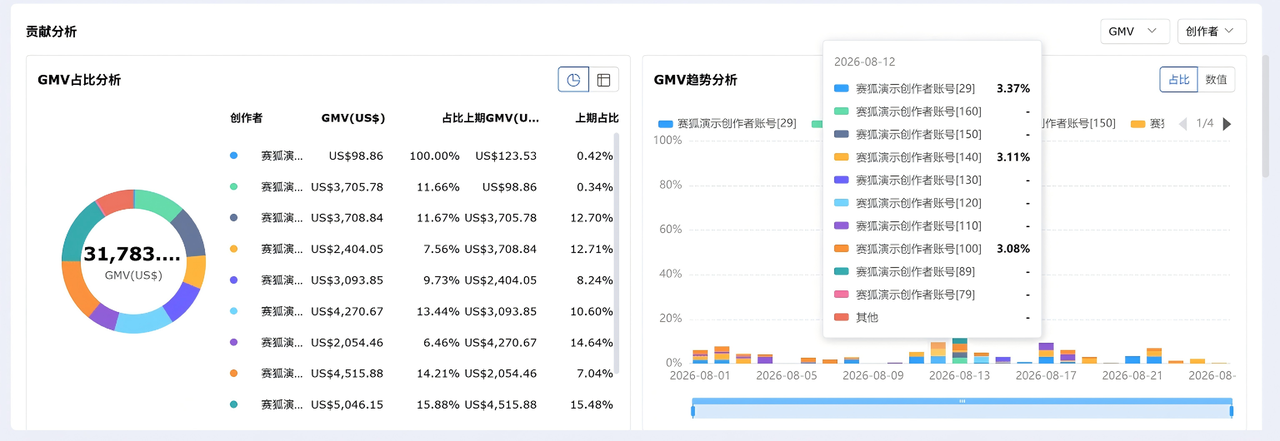
The first step in preparing for Black Friday and Cyber Monday is identifying which products are worth investing more in and which should be cut. Saihu ERP’s TikTok Product and Content Analytics feature lets you view profit, sales, spending, returns and exchanges, inventory, creator, sample, and advertising data across multiple dimensions, including short videos, livestreams, product IDs, MSKUs, SKUs, parent products, and stores. This provides data to inform product selection, stocking, and ad investment decisions for major promotions.
- Permission settings:Go to [Settings] - [Role Management], then check the view/export permissions for “TikTok Product Analytics” under Feature Permissions.
- View overall performance:Go to [Multi-Platform] - [Data] - [TikTok Product & Content Analytics] - [Analytics Dashboard]. Filter by store, time, and currency; switch between daily, weekly, and monthly views to review metrics such as sales, profit margin, ad spend, GMV, order volume, and creator count.
- Break down GMV: In GMV Breakdown Analysis, first review the proportions and changes across the three content types—livestreams, short videos, and product cards—then review the proportions of affiliate creators and seller-operated activity by order source to determine the main source of sales during the promotion.
- Drill down to individual products:Switch between the Short Videos, Livestreams, Product ID, MSKU, SKU, Parent, and Store tabs to locate specific products and review sales, profit, inventory, ads, and sample details.
- Enable period-over-period comparisons and settlement criteria:Check “Show period-over-period comparison” to view week-over-week changes, and check “Count settled orders only” to exclude the impact of unsettled orders. Customize the metric columns to display.
- Export for review:Go to “Detailed Analysis” and select a custom date range. Data can be exported by day for comparison and review before and after the promotion.
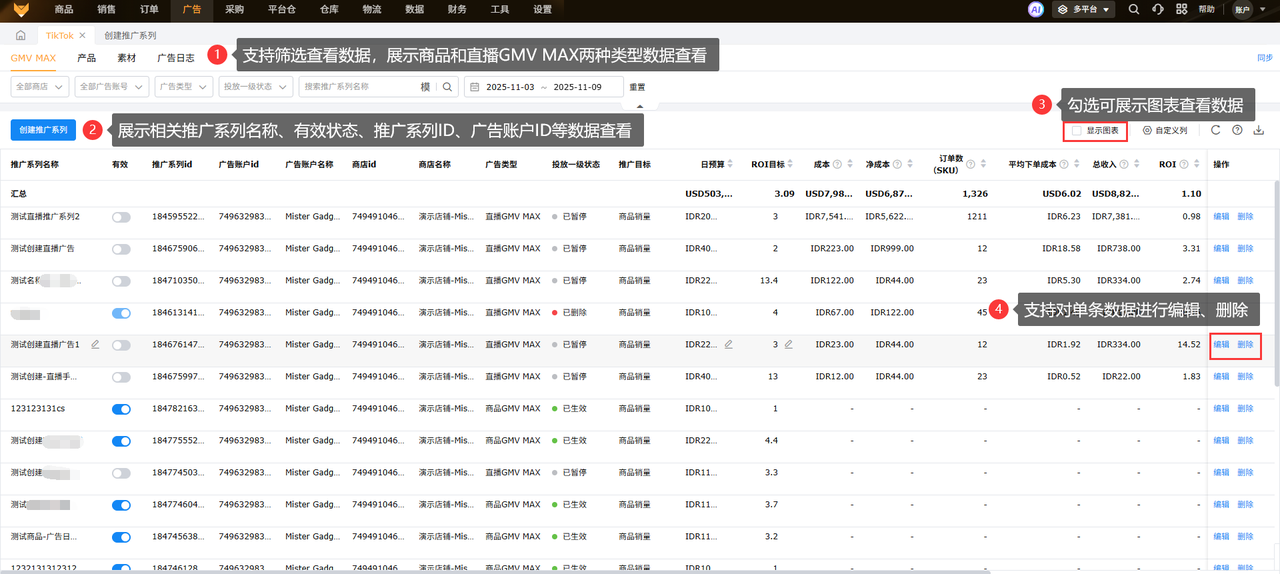
3.2 TikTok Ad Management and Optimization
During major promotions, there are many ad accounts and campaigns move quickly. Switching between multiple accounts can make it easy to miss the optimal time to run ads. Saifu ERP supports centralized monitoring of multiple TikTok ad accounts, bulk creation of GMV MAX ads, and ad spend and ROI tracking by SKU. Combined with bulk activation and pausing, this enables timely cost control and helps ensure ad budgets are spent where they matter most.
- Configure permissions:In [Settings] - [Role Management], check the “TikTok Ad Management” permission under Multi-Platform.
- Create and authorize an ad account:In [Settings] - [Store Authorization] - [TikTok], click “Create Ad Account,” enter the ad account email, and proceed to the TikTok platform to complete account setup. Then click “Authorize Ads for This Store,” sign in to TikTok for Business (the corresponding network must be enabled), check the ad permissions, and select the ad accounts to link to complete authorization.
- Centralized monitoring:Go to [Multi-Platform] - [Ads] - [TikTok], and filter by store, ad account, and primary delivery status to review the daily budget, target ROI, cost, and order count. Switch between the “Ad Account,” “Store,” and “Ad Account + Store” views to check balances and budgets, and drill down to promotion series, products, creative assets, and ad logs.
- Set time-based budgets:Set time-based budget rules for peak Black Friday and Cyber Monday traffic periods, increasing spend during peak hours and automatically tightening budgets during quieter periods.
- Create a Product GMV MAX ad:Click “Create Promotion Series,” then enter the ad account, store, promotion series name, start and end times, target ROI, and daily budget. Select some or all products. For creative, choose automatic selection (quickly add creator information and enable affiliate creative content) or manual selection (add content by post ID or caption). Confirm to complete creation.
- Bulk create Product GMV MAX ads:Use the bulk operation feature, which supports one ad series per product. Enter the ad information, add products and creative assets for each series, and edit the target ROI, daily budget, and start and end times.
- Livestream GMV MAX:For livestream sessions during major promotions, you can create Livestream GMV MAX ads by entering the account, store, and livestream source.
- Activate or pause ads in real time to control costs:In the promotion series list, bulk activate, pause, edit, or delete ads. Pause ads with declining ROI promptly to avoid wasted spend.
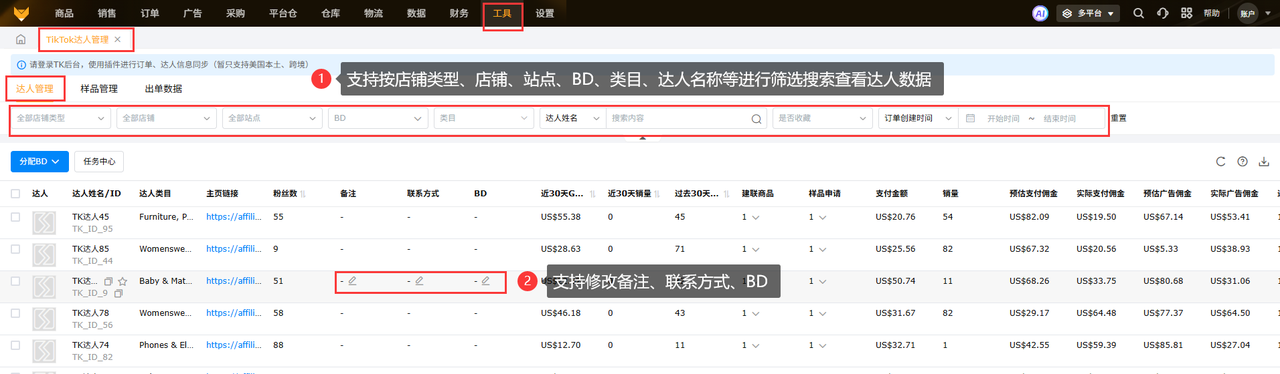
3.3 TikTok Creator Management and Invitations
Connecting with high-quality creators ahead of major promotions is key to driving a surge in traffic. Saifu ERP integrates the entire “sourcing, outreach, and management” process on one platform. It supports bulk filtering, bulk invitations, template direct messages, and sample and order tracking, helping ensure that high-quality creators and videos that generate orders are not lost.
- Preparation:First install the Saifu TK Assistant plugin and sign in to your TikTok back-end account. Go to [Multi-Platform] - [Tools] and open [TikTok Creator Management] / [TikTok Creator Invitations]. If authorization is not complete, click “Authorize Now,” then complete Affiliate authorization in [Settings] - [Store Authorization].
- Fetch creator data:Go to “Task Center” - “Task List,” edit a task to set the data time range, designated store, and execution frequency, then enable it. Failed records can be retried individually or in bulk.
- Filter target creators:In the creator pool, filter by country/region, creator category, follower count, follower demographics, GMV, sales, average commission rate, posting rate, and whether the creator is fast-growing or agency-affiliated. Check “Show only creators not invited in the past 90 days” to prioritize reaching new creators. Save frequently used conditions as filter templates for one-click reuse.
- Bulk invitations:Select one or more creators and click “Invite,” or click “Auto-invite” and set the quantity to send invitations in bulk (up to 1000 per batch). Choose either “Template Invitation” (the system automatically creates a targeted collaboration and syncs it to TikTok Seller Center) or “Existing Targeted Collaboration” (note that each collaboration can invite up to 50 people).
- Configure invitation templates:Click “Create Template,” enter a template name, select products, set the Standard commission rate and Shop Ads commission rate, write the invitation text, set the sample policy (manual review/automatic approval) and expiration date, enter an email address and phone number, then save. Templates can be edited or deleted.
- Follow up via direct message:Create a direct message template (template name, message content, and 1 products to send). Select creators, click “Bulk Direct Message,” choose a message template, and confirm to improve communication efficiency.
- Sample and order management:Sample management supports filtering and exporting by store, site, salesperson status, and creator name. Order data can be viewed by video, product, order, or BD. BD assignments can be made in the video view, and the settlement sales amount calculation formula can be set in the order view.
- Creator profile management:Add notes and contact details to creator profiles, click the star to save creators as favorites, assign BD individually, in bulk, or by import, and click the homepage link to go directly to a creator’s profile.
3.4 TikTok end-to-end profit accounting
Once a major promotion is over, the last thing you want is unclear profit figures. Saihu ERP’s TikTok profit report reproduces TikTok’s settlement report one-to-one. It supports automatic profit calculations for orders across multiple local stores, and can also account for the cost of product review orders. See your actual gross profit before settlement, while funds receivable are tallied automatically to provide early warnings of financial anomalies.
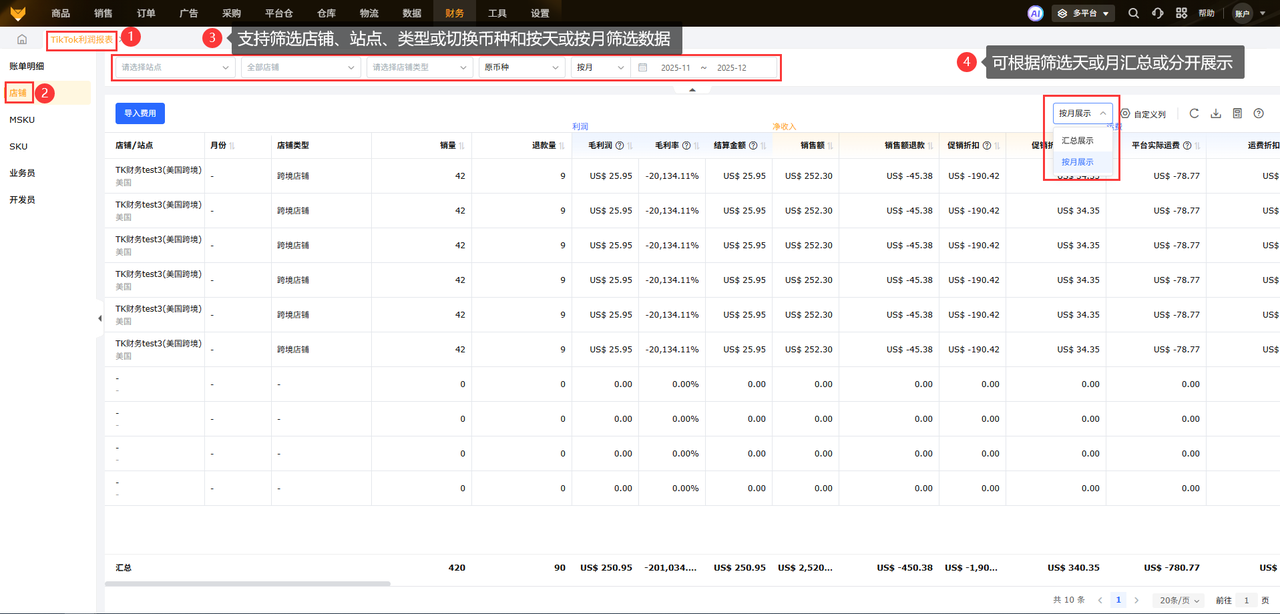
- View the profit report:Go to [Multi-platform] - [Finance] - [TikTok Profit Report]. After authorizing a store, the system initializes synchronization of data for the authorization month and the previous month, then updates data for the most recent three days daily.
- Store summary: Filter by site, store, and currency to view each store’s income and expense details and gross profit by day or month.
- Multidimensional drill-down:Switch between store, MSKU, SKU, salesperson, and product developer views to see income and expense details and gross profit for each dimension. Data can be displayed separately or summarized by day or month.
- Import additional expenses:Click “Set Expense Items” to customize expense items. Click “Import Expenses,” select a type (custom store expense/custom product expense), download and fill in the updated template, then add the file to import it. Import records show details of successful and failed imports.
- Check cost calculation rules:Product cost = purchase cost + first-mile shipping cost. Values are selected in this priority order: order import, shipment dispatch, and matched local SKU. Shipping costs are taken from imported shipping costs, shipping costs returned by the logistics provider, or estimated shipping costs. Switch between UTC time and site time to check settlement details.
For 2026 TikTok Black Friday and Cyber Monday in the US, the competition is no longer simply about driving volume with low prices. Refined operations are key to standing out. To capture traffic during this TikTok US promotion, manage the timing, plan inventory and logistics, and maintain compliance and performance standards.
With Saihu ERP’s digital capabilities, manage inventory, ads, data, after-sales service, and creators in one end-to-end system. Reduce manual errors, handle peak-season traffic efficiently, and grow both sales and profits.
Product link 1:Free cross-border e-commerce ERP registration
Product link 2:Claim 36000 orders for free with no minimum requirements
Customer service 3:Free, real-time answers to cross-border e-commerce ERP questions
*Disclaimer: Some text, images, and other materials on this site are sourced from the internet and are provided for communication and learning purposes only. If you believe any content infringes your rights, please contact us via direct message; we will address it and remove it as soon as possible. Without authorization from this site, no organization or individual may reproduce, excerpt, adapt, or otherwise use its content.
Source: Original website · Read the full article
Related Learning

TikTok Shop Thailand Again Extends Flood-Affected Order Shipping Deadline to Month 10, Day 17
News on month 10, day 16: TikTok Shop's Thailand local marketplace has again extended order shi…
TikTok Shop U.S. sales reached 3 billion dollars in Q58.7
AMZ123 learned that a recent report released by e-commerce data analytics company Charm.io shows tha…
TikTok Shop U.S. Trend Report Released; Top Sellers Account for 59% of Sales
AMZ123 learned that Marketplace Pulse recently released the “2026 TikTok Shop U.S. Trend Report.” Th…