 EN
ENHow to Run TK Ads? A Complete Practical Guide to Setting a TikTok Ad Budget in 2026
For cross-border TikTok Shop e-commerce, running TK ads is a core channel for growing a store, testing products, and generating orders consistently. The main challenge for most new sellers is not knowing how to run TikTok ads, being unable to distinguish which TikTok Shop ad scenarios are suitable, and setting TikTok ad budgets haphazardly, which leads to failed learning phases, wasted costs, and extremely low returns on ad spend. Even experienced sellers still find ad placement one of the most challenging aspects of operations.


This article draws on the latest TikTok ad placement rules for 2026, with a focus on practical implementation for sellers, precise budget management, and risk control. It breaks down standardized ad placement workflows, quantifiable budget models, and data optimization logic. It is packed with practical advice and no fluff, and suits both beginners and experienced sellers looking to optimize.


🎁🎁TikTok dayparting budget tool:Use for 0 yuan and get 3 ten thousand orders


I. Getting Started with TK Ads: Ad Types, Account Opening Requirements, and Preparations


To run TikTok ads well, the first step is not to create a new campaign. It is to clarify the ad types, open an account in compliance with requirements, and complete the necessary groundwork. This is the foundation for avoiding wasted budget and ads that fail to gain traction, and a key prerequisite that many sellers overlook.


1.1 Three Core TikTok Shop Ad Types for 2026 (Precisely Matched to Scenarios)


TikTok Shop ads are not a one-size-fits-all format. Different ads serve different operational scenarios, and choosing the wrong type can make your budget ineffective:
- VSA Video Shopping Ads: Primarily used to test new products and drive product discovery. Suited to selling through short videos, they work well for cold-starting new stores and testing the potential of new products, with broad audience reach and low testing costs.
- PSA Product Shopping Ads: Leverages exposure from TikTok search and recommendation traffic to precisely reach users who are actively searching. These users have strong purchase intent, making this format suitable for stabilizing best-seller performance and driving targeted conversions, with more stable returns on ad spend.
- GMV MAX Live Shopping Ads: Designed specifically for live rooms, with the goal of maximizing GMV. Suitable for established live rooms aiming to boost sales or scale up during major promotions, the system uses automated bidding to secure volume. Best suited to sellers operating live streams regularly.
1.2 Latest Account Opening Qualifications and Account Eligibility Rules
TikTok Shop cross-border advertising policies for 2026 have been tightened across the board. The individual account opening channel is permanently closed; only business entities may open accounts. Applicants must provide a mainland China business license, legal representative information, and cross-border store qualifications, and complete official store binding and corporate verification of the advertising account. Accounts without compliant qualifications may face restricted traffic, ad disapproval, or frozen budgets.
1.3 Essential Preparations for Ad Placement (All Required)
For many sellers, the main reason TikTok ads do not perform is not an insufficient budget, but missing preparatory work:
- Basic linking:Precisely link the TikTok Shop store and ad account, and avoid linking multiple stores to the same account.
- Data tracking: Install the pixel and set up conversion event tracking (orders, add-to-cart, and payments) to ensure accurate data transmission.
- Creative preparation: Localize creative assets for the target market, avoiding reused, overly similar, or non-compliant content to ensure a high approval rate.
- Store setup: Complete product details, fulfillment timeframes, and after-sales policies to avoid failing to convert traffic driven by ads.
II. How to Set TikTok Ad Budgets Precisely: Quantified by Stage
Budgets should not be set by guesswork, nor should one figure be used for every situation. From cold start and product testing to scaling and cutting losses, each stage of advertising requires different budget logic and actions. Many sellers’ losses stem from mixing up the actions for these stages: setting daily budgets blindly, changing budgets during the learning phase, using the same logic for product testing and scaling, and having no stop-loss threshold.
Below, each stage is explained using the structure “practical actions → stage-specific challenges → advanced guidance,” with clear steps and corresponding advanced solutions.
2.1 Cold-Start Learning Phase Budget Rules (0–72 hours): Maintain the Minimum Budget and Don’t Interrupt the Learning Process
The ad learning phase is a critical stage for system modeling. Budget decisions during these 72 hours largely determine the account’s ability to secure traffic later on. Start by following these three actions:
- Minimum budget requirement:Daily budget per ad group ≥ 50 USD. Below this amount, the system cannot consistently secure traffic, and the learning phase is very likely to fail.
- Prohibited actions:During the learning phase, do not frequently pause and restart ads or adjust the budget by more than 30% in a single change. Otherwise, the system will reset its modeling, wasting all the budget spent in the early stage.
- Core logic: Small, steady spend helps the system accurately match the target audience and prioritize building conversion data
Pain points at this stage:Learning periods often go wrong not because there are too few actions, but because you are "too quick to act." If the budget is too low, the system cannot get enough volume and modeling fails outright. If you adjust the budget too frequently, the system may detect a major change and reset the learning period, wasting all the spend from the previous few days. More realistically, most sellers handle orders during the day and only have time to check ads at night. By the time they notice the budget has run away, the learning period has already been disrupted.
Advanced guide:Saihu ERP's TikTok ad management supports setting time-based budget rules, turning budget adjustments from "manually monitoring ad performance" into "automatic rule execution": configure once, and the system will run automatically on a daily or weekly cycle. During the learning period, it maintains small, steady spend according to a preset schedule, so operators do not need to repeatedly adjust budgets manually. This prevents "accidentally interrupting the modeling process" at the source.
2.2 Budget model for testing new products: Test multiple products with small budgets to cap testing costs
The key to product testing is "testing multiple products with small budgets while strictly controlling total losses." Do not let a single product consume the entire budget. Follow these steps:
- Budget per campaign: 30-80 USD per day. Use a low budget to gather baseline data and test the fit of creatives, audiences, and products
- Bulk product testing: Run 5-8 product-testing campaigns simultaneously per account, with the total budget capped at 300 USD
- Testing period: 3-5 days. Immediately stop campaigns that generate no valid add-to-cart or order data to prevent continued losses
Pain points at this stage:The testing phase is when the budget is most dispersed. With 5-8 campaigns running at the same time, it is impossible to manually keep track of which campaign to scale up and which to stop. If multiple accounts are testing products simultaneously, missing an adjustment on even one campaign could mean burning through dozens or even hundreds of dollars in a day. When the pace gets disrupted, a cycle that should take 3-5 days to reach a conclusion gets extended, wasting the product-testing window.
Advanced guide (Saihu solution):Saihu's time-based budgeting lets you set budget tiers separately for each ad account. During product testing, you can configure a schedule of "lower budgets during off-peak hours to control costs, higher budgets during peak hours to gather data." The system executes the rules automatically. Operators only need to set the rules during configuration, instead of manually adjusting each campaign's budget every day.
2.3 Budget strategy for scaling winning products: Gradual increases + time-based budgets, reserving spend for the hours that drive orders
Once a product has been tested and shown to be a positive-ROI winner, do not make a large one-time budget increase. Scale "step by step":
- Scaling rule: Increase the daily budget by 20%-30% to make small adjustments that fit the system's traffic model
- Time-based budget: Use the time zone of the target market's site. Allocate a higher share of the budget to peak conversion periods (evenings and weekends) and reduce spend during off-peak periods
- Scaling limit: Set a budget ceiling based on the product's profit to avoid excessive spending that erodes profitability
Pain points at this stage: The biggest scaling pitfall is "spending the budget at the wrong time." Prime shopping hours for European and American buyers often fall during the middle of the night in China. If operators adjust budgets according to Beijing time, they are effectively scheduling traffic for buyers around their own routines—traffic may spike in the early hours but convert poorly, and by the time traffic surges in the U.S. market at night, the account budget may already be depleted. When scaling across multiple accounts at once, adjusting budgets for each time slot individually is even less practical. One missed or incorrect adjustment can mean missing an entire traffic peak.
Advanced guide: This is exactly where Saihu's TikTok time-based budgeting feature comes into play. Its 7-day × 24-hour visual grid monitors ad performance for operators, so budgets follow traffic peaks. Steps to use the feature:
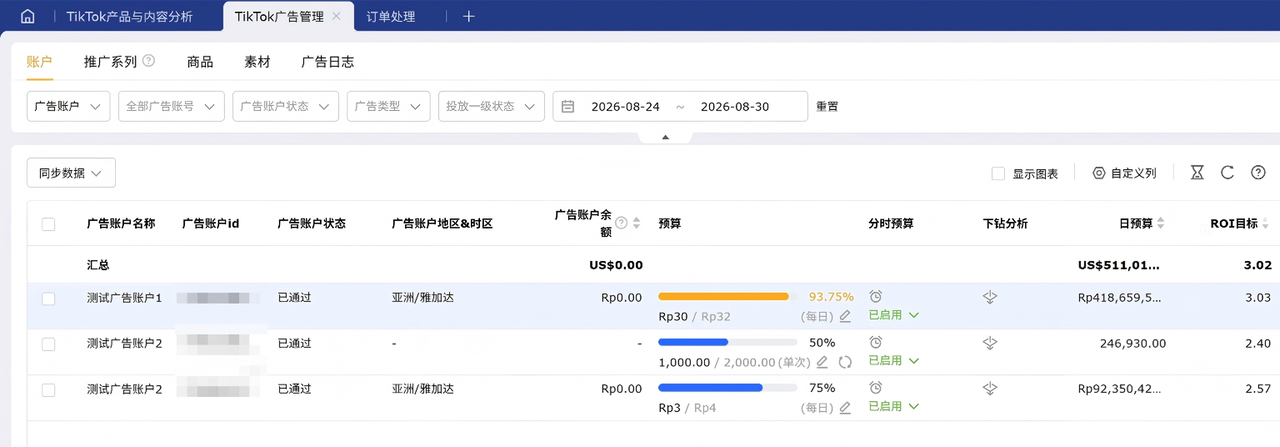
- Go to the [Ads] - [TikTok Ad Management] - [Accounts] page, find the target ad account, and click [Set Up] in the "Time-Based Budget" column. (For first-time use, first select the "Multi-platform - TikTok Ad Management" permission under [Settings] - [Role Management], and authorize the TikTok ad account under [Settings] - [Store Authorization].)
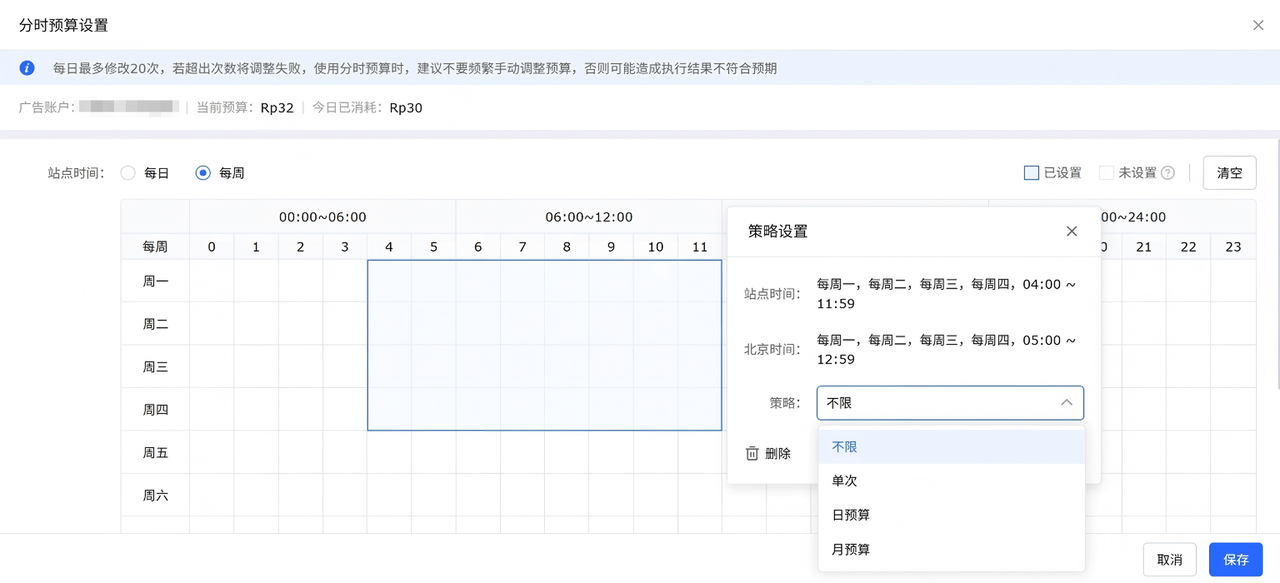
- Choose a setup period: Set time-based rules by "day" or "week." The weekly view is a grid of 7 days × 24 hours, from Monday to Sunday
- Select the relevant time slots in the schedule and allocate budgets based on historical order data: lower the budget during periods with fewer orders and raise it during order peaks
- Check the time slots in the "Strategy Settings" pop-up. The system displays both the site time and Beijing time to ensure that the selected slots correspond to high-conversion periods in the target market
- Choose a strategy type and enter an amount: The four supported types are unlimited, one-time, daily budget, and monthly budget. The amount, currency, and minimum amount follow the current advertiser budget management settings
- Set the budget type for "Unconfigured time slots." Blank time slots will not trigger automatic changes, preventing unintended spend
- Click Save. The rules take effect immediately and will run automatically each week thereafter, with no need to configure them again
Notes: The budget for the same ad account can be modified at most 20 times per day. Any further changes will fail. Time slots for the same ad account cannot overlap on the same day. After enabling time-based budgeting, avoid frequent manual budget adjustments, as they may cause the results to differ from expectations.
2.4 Standardized budget stop-loss mechanism: Set a limit in advance so losses do not carry over to the next day
Setting stop-loss thresholds in advance for all campaigns is key to cost control for cross-border sellers. Here are the steps:
- Data-Based Stop Loss: After the learning phase ends, if CPA exceeds 30% of the profit per product or ROI falls below the industry average, pause the campaign immediately
- Time-Based Stop Loss: If daily spend is high, there are 0 conversions, and clicks are low, pause the campaign immediately without waiting
- Bulk Stop Loss: When multiple campaigns are losing money at the same time, pause the underperforming campaigns and shift the budget to high-performing campaigns
Pain point at this stage:The biggest risk with stop-loss measures is "not spotting the problem in time." Ad data is scattered across the TikTok dashboard, so you have to check ROI and CPA account by account and campaign by campaign. By the time you manually work out which campaigns are losing money, you may already have wasted another day or two of spend. This is even more noticeable when managing multiple accounts: miss one loss-making campaign, and you could waste hundreds of dollars in a single night.
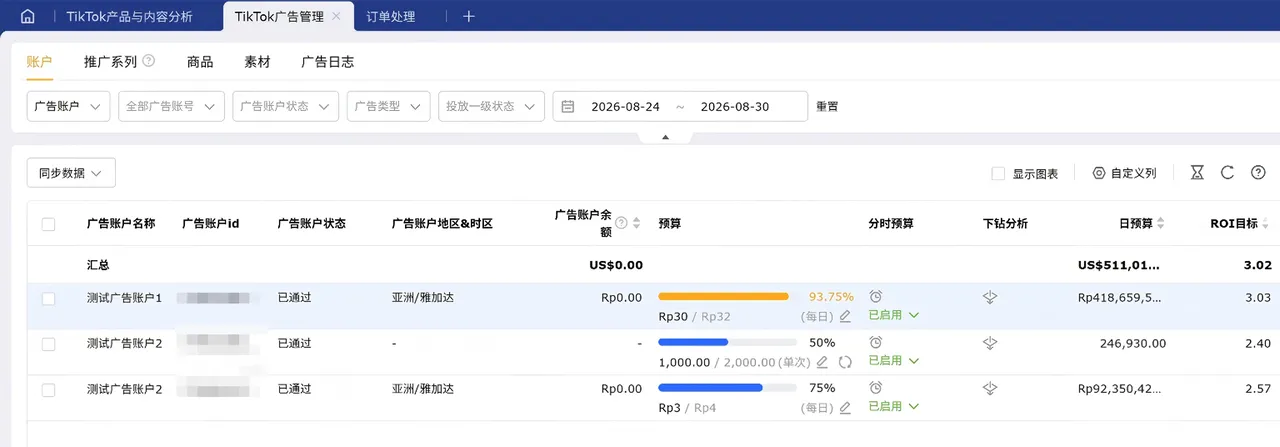
Advanced Guide: Saihu's [TikTok Ad Management] feature brings the key stop-loss metrics together on one page. The account list directly displays each ad account's balance, spend, ROI target, daily budget, and other data. You can drill down from an account to campaigns, products, creatives, and ad logs to quickly pinpoint the source of losses. Then, adjust budgets precisely based on ad spend and ROI to cut losses in time and prevent wasted ad budget.
2.5 Common Budgeting Mistakes for Beginners (What to Avoid)
- Mistake 1: Spreading the budget evenly throughout the day without accounting for traffic peaks and lulls, resulting in insufficient budget during peak hours and wasted spend during slow periods
- Mistake 2: Frequently changing budgets, bids, and targeting disrupts the system's model and causes ad rankings to keep declining
- Mistake 3: Using the same budget for product testing, scaling, and maintaining performance, resulting in a mismatch with the scenario and persistently low return on ad spend
- Mistake 4: Looking only at spend and not profit, then scaling blindly, leading to high sales but low profits or even losses
III. Complete Workflow for Setting Up and Optimizing TikTok Shop Ads
Once you understand TikTok Shop ad budgeting, you can tackle the practical question of how to run TikTok ads. This guide breaks down a standardized, actionable workflow across four areas: campaign setup, data monitoring, optimization, and scenario-based adaptation.
3.1 Standardized Ad Campaign Setup Workflow
- Step One:Match the campaign objective to your goal: choose "Product Purchases" for product testing, "Reach" for product seeding, and "Maximize LIVE GMV" for livestreams
- Step Two: Target the right audience based on product category and target market. Filter by age, gender, interests, and spending tier to avoid targeting too broadly or too narrowly
- Step Three: Set bids appropriately. Beginners should start with the system's automatic bidding; experienced advertisers can manually control bids based on historical data
- Step Four: Upload high-quality localized creatives, link the relevant SKU, set a basic daily budget and campaign schedule, and submit for review
3.2 Core Data Metrics: Monitoring and Optimization
Ad optimization should be data-driven, not based on gut feeling. Monitor these 5 key metrics:
- Click-Through Rate (CTR): If it is below the industry average, the creative is poor quality and should be replaced immediately
- Add-to-Cart Rate:A low add-to-cart rate indicates imprecise targeting, so optimize the target audience
- Cost per Acquisition (CPA): If it exceeds the profit threshold, lower the bid or pause the campaign in time
- Return on Investment (ROI): The key performance metric. Gradually scale campaigns with positive ROI and cut losses promptly when ROI is negative
- Spend Rate: If spend is too fast with no conversions, tighten the budget and optimize bids
3.3 Strategies for Adapting Campaigns to Different Scenarios
- New store cold start:Focus on VSA short video ads. Test products with multiple small-budget campaigns to build store authority and establish baseline sales
- Maintaining best-seller performance:Pair with PSA Product Shopping Ads to capture high-intent search traffic and maintain steady daily conversions
- Livestream sales pushes / major promotions:Use GMV MAX ads to scale automatically with the system and aim for peak livestream GMV
3.4 Common TikTok Shop Advertising Pitfalls to Avoid
- Creative pitfalls: Reusing domestic Douyin creatives, using repetitive visuals, or failing to localize copy can lead to review rejection or restricted traffic
- Account pitfalls:Running campaigns across multiple accounts fragments data and makes unified performance reviews impossible. High-performing campaigns cannot be reused, while underperforming campaigns continue to drain spend
- Operations pitfalls:Optimizing ad metrics alone while neglecting inventory, fulfillment, and after-sales service can result in successful traffic acquisition but very high refund rates, wasting the ad budget
- Execution pitfalls:Frequently creating or deleting campaigns and making arbitrary landing page changes can lower account authority and make it difficult to scale over the long term
The key to TK advertising is not blindly pouring in budget, but choosing the right ad type, quantifying budgets by phase, standardizing hands-on optimization, and managing data intelligently.
New sellers should abandon the mindset of running ads indiscriminately and apply this article’s latest budget model and hands-on workflow 2026. Combined with Saihu ERP’s professional ad management tools, this can effectively reduce trial-and-error costs and improve TikTok Shop ad spend efficiency, helping stores gain traction steadily and achieve sustained profitability.
Product link 1:Free cross-border e-commerce ERP registration portal
Product link 2:Claim 36000 orders for free, with no minimum requirements
Human customer service 3:Real-time Q&A on the free cross-border e-commerce ERP
*Disclaimer: Some text, images, and other materials on this website are sourced from the internet and are provided for exchange and learning purposes only. If you believe any content infringes your rights, please contact us by private message, and we will remove it promptly. Without authorization from this website, no organization or individual may reproduce, excerpt, adapt, or otherwise use the content of this website.
Source: Original website · Read the original
Related Learning

TikTok Shop U.S. Trend Report Released; Top Sellers Account for 59% of Sales
AMZ123 learned that Marketplace Pulse recently released the “2026 TikTok Shop U.S. Trend Report.” Th…

TikTok Shop U.S. sales reached 3 billion dollars in Q58.7
AMZ123 learned that a recent report released by e-commerce data analytics company Charm.io shows tha…

Vietnam TikTok Shop GMV grows 38% in the first 9 months, share rises to 45%, closing in on Shopee
According to Chuhaiwang, a report for the third quarter of 2026 released by Vietnamese e-commerce co…