 EN
ENHow to Link a Bank Card and Withdraw Funds from Alibaba.com? Annual Fees for Alibaba.com
In the e-commerce sector, Alibaba Group is undoubtedly a leader. Among its platforms, Alibaba.com is a hub for foreign trade businesses. Many merchants have earned substantial profits on the platform, but how to smoothly withdraw these funds to their bank cards has become a key concern. Today, I’ll explain in detail how to link a bank card and withdraw funds from Alibaba.com.
I. Preparations
Before linking a bank card and withdrawing funds, we need to complete the following preparations:
1. Real-name verification:Make sure your Alibaba.com account has completed real-name verification; this is a prerequisite for withdrawing funds.
2. Link a mobile phone number:Make sure your mobile phone number is linked to your Alibaba.com account so that you can receive withdrawal notifications.
3. Bank card information:Prepare a bank card in your own name. A debit card is preferable, as credit cards do not support withdrawals.
II. Linking a Bank Card
1. Log in to Alibaba.com:Open a browser, enter the Alibaba.com website address, and log in to your account.
2. Go to “My Account”:Click “My Account” on the homepage to go to your personal account center.
3. Select “Financial Management”:On the personal account center page, find the “Financial Management” option and click it.
4. Select “Withdraw”:On the Financial Management page, find the “Withdraw” option and click it.
5. Link a bank card:On the withdrawal page, click “Link Bank Card” and follow the prompts to enter your bank card information, including the card number, bank name, and cardholder’s name.
6. Verify the information:After you have filled in the information, the system will send a verification code to your mobile phone. Enter the code to complete the linking process.
III. Withdrawing Funds
1. Go to the withdrawal page:After linking your bank card, go to the “Financial Management” page again and select “Withdraw.”
2. Enter the withdrawal amount:On the withdrawal page, enter the amount you want to withdraw. Note that it cannot exceed your account balance.
3. Confirm the withdrawal details:Carefully check the withdrawal amount and bank card information. Once you have confirmed they are correct, click “Confirm Withdrawal.”
4. Wait for review:After you submit a withdrawal request, the system will review it. Once approved, the funds will arrive in your account within 1-3 business days.
IV. Important Notes
1. Withdrawal hours:Withdrawals are processed on business days from 9:00 to 18:00. Withdrawal requests are not processed on weekends or public holidays.
2. Service fees:A service fee may apply when withdrawing funds. The specific fee is subject to the bank’s rules.
3. Withdrawal limits:The limits for individual withdrawals and daily withdrawals may vary. Refer to Alibaba.com’s rules for details.
4. Security reminder:When linking a bank card and withdrawing funds, protect your personal information and avoid disclosing it.
V. Frequently Asked Questions
Q: Why was my withdrawalhow to link a bank card and withdraw funds from Alibaba.comrequest rejected?
A:A withdrawal request may be rejectedhow to link a bank card and withdraw funds from Alibaba.comfor the following reasons:
1. Real-name verification has not been completed for the account.
2. The bank card information was entered incorrectly.
3. The withdrawal amount exceeds the limit.
4. The bank card has been frozen or canceledhow to link a bank card and withdraw funds from Alibaba.com。
Q: How long does it take for a withdrawal to arrive?
A: Withdrawal processing usually takes 1-3 business days. The actual time depends on the bank’s processing.
Q: How can I check the status of a withdrawal?
A: You can check the withdrawal status on the “Financial Management” page or look out for SMS notifications.
VI. Summary
Withdrawing funds from Alibaba.com after linking a bank card is simple; just follow the steps above. We hope this article canHow to link a bank card and withdraw funds from Alibaba.comhelp you. We wish you great success on Alibaba.com!
Alibaba.com withdrawal fees
On the vast stage of cross-border e-commerce, Alibaba.com serves as a bridge connecting foreign trade businesses with global markets, and its importance is self-evident. However, at the final stage of the transaction process—withdrawal of funds—the fees and convenience directly affect businesses’ profitability and operational efficiency. Against this backdrop, XTransfer stands out for its unique advantages and has become the first choice for many foreign trade businesses withdrawing funds from Alibaba.com. [Open an account now for 0 yuan]
With “free for life” as its core selling point, XTransfer has completely transformed the traditional fee model for cross-border payment services. From account opening and account management to receiving and withdrawing funds, there are no fees at any stage, significantly reducing the global operating costs of foreign trade businesses. This policy not only reflects XTransfer’s deep concern for small and medium-sized businesses, but has also earned it widespread praise amid fierce market competition.
In addition to its fee advantages, XTransfer supports payment collection in up to 14 currencies, meeting the diverse settlement needs of foreign trade businesses around the world. The account is opened directly in the company’s name, enhancing the legitimacy and credibility of transactions and strengthening the company’s image in international markets. XTransfer’s account-opening process is also simple and fast. Businesses do not need to establish an overseas company or visit a local bank branch in person, saving considerable time and labor costs.
XTransfer also performs exceptionally well in terms of the speed of fund transfers. By using local clearing systems to enable real-time receipt of funds, businesses can receive payment and ship goods immediately, significantly shortening the fund recovery cycle. This feature is especially important for foreign trade businesses that need to respond quickly to market changes. In addition, XTransfer’s local-currency pricing feature effectively reduces foreign exchange losses, increases buyer acceptance, and facilitates transactions.
Even more noteworthy, XTransfer provides online, real-time currency exchange services and supports transactions on weekends, allowing businesses to manage funds flexibly at any time. Its FX rate locking feature also helps businesses lock in favorable exchange rates and reduce the risks posed by foreign exchange fluctuations, providing strong support for stable business operations.
XTransfer also demonstrates itsHow to link a bank card and withdraw funds from Alibaba.comstrong service capabilities in areas such as tax refunds, rebates for preferential exchange rates, and compliant foreign exchange settlement and declaration services. It provides businesses with a one-stop solution, eliminating the cumbersome process of filing declarations themselves and ensuring the compliance and security of fund transfers. Businesses can also earn additional returns through preferential exchange rates and rebate policies, further improving profitability.
In summary, with its free-for-life policy, multi-currency payment collection capabilities, fast fund transfers, and comprehensive financial services, XTransfer is an ideal choice for foreign trade businesses withdrawing funds from Alibaba.com. It not only reduces operating costs, but also improves the efficiency and security of fund transfers, providing strong momentum for businesses’ global expansion.
US dollar withdrawal process on Alibaba.com
Log in to Alibaba.com, then click Financial Management. Under Withdrawals, enter the amount you want to withdraw, select your receiving account, and click Submit to complete the withdrawal process. According to information found on Alibaba.com, the Weifang branch of Alibaba.com was established in 2010, and nearly 2000 foreign trade businesses in Weifang partner with Alibaba.com. “Weifang Alibaba.com” is an export marketing and promotion service that helps small and medium-sized businesses in and around Weifang expand their international trade. Based on Alibaba.com’s global business-to-business e-commerce platform, it showcases and promotes suppliers’ businesses and products to overseas buyers to generate trade opportunities and orders. It is an important online platform for foreign trade exporters in Weifang seeking to expand their international trade.
Are withdrawals from Alibaba.com to the legal representative’s personal bank card tax-exempt?
Withdrawals to the legal representative’s personal bank card are tax-exempt. The purpose of withdrawing funds to the legal representative’s bank card is exactly this, and companies often withdraw funds to the legal representative’s card. As long as your company continues to declare goods to customs and receive payments, and these transactions continue on a rolling basis, there generally should not be any major issues. Coordinate with your finance department to see how to reconcile the accounts.
Additional information:
I. How do you withdraw funds from Alibaba.com? You can transfer funds from Alipay to a bank card.
1. Online credit insurance orders: Alibaba.com recommends that each order using the payment methods above be for less than 5000 US dollars. The platform charges different fees depending on the circumstances of each order. For example, using One-Touch (over 5000 US dollars) is free; Alibaba.com logistics: 1%; offline shipping: 2%. A certain percentage in fees is also charged when withdrawing funds, depending on the bank. A student just asked a question about how to withdraw funds from Alibaba.com; go take a look.
2. Offline orders: There are many payment methods, including PayPal, TT, bank transfer, and Western Union. It is more convenient if the customer has an RMB account. A direct bank transfer is OK.
II. How do I set up a payment account on Alibaba.com?
As a seller on Alibaba.com, whether or not you have opened an account, if your order transaction is successful, the funds will be sent to your Alipay International account. To withdraw funds, you must link a receiving account, then withdraw the funds from your Alipay International account. If you receive RMB, you need to link an Alipay account that has completed real-name verification to receive the funds. If you receive US dollars, you need to link a bank card that can receive payments from Citibank Singapore to withdraw funds. How do I set up a payment account on Alibaba.com? The steps for setting up an Alipay International account are as follows: If you have not yet set up an Alipay International account, first log in to My Alibaba backend - Online Wholesale Market - Alipay International Account to activate it. If you have already opened an Alipay International account, you can log in directly to My Alibaba backend - Online Wholesale Market - Alipay International Account. How do I withdraw money from Alibaba.com? Alibaba has many settings in the favorites section, but they generally take the user experience into account, so the process is not complicated. After trying it a few times, you should be able to find the steps for setting it up. Once you are familiar with it, you can operate it easily, even with your eyes closed. This article is a brief introduction. If you have any questions, you can provide feedback online.
Source: original website · Read the original text
Related Learning
How to Set Prices on Alibaba.com? How Much Does Alibaba.com Cost Per Year?
In cross-border e-commerce, Alibaba.com is a platform that many sellers are eager to join. As a glob…
How to Set Up AI Auto-Replies on Alibaba.com? Auto-Reply Settings for Alibaba Sellers
In cross-border e-commerce, Alibaba.com is one of the world's largest B2B trade platforms, rece…
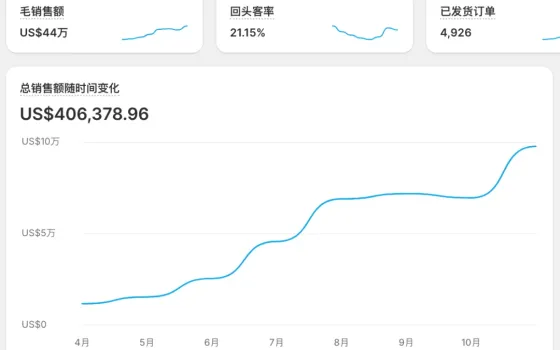
From $11,649 to $97,746 in 7 Months: A Full-Funnel Managed Operations Case Study of 739% Growth for Brand D's Independent Website
From $11,649 to $97,746 in 7 Months: A Full-Funnel Managed Operations Case Study of 739% Growth for …