 EN
ENHow to Set Up AI Auto-Replies on Alibaba.com? Auto-Reply Settings for Alibaba Sellers
In cross-border e-commerce, Alibaba.com is one of the world's largest B2B trade platforms, receiving a huge volume of inquiries every day. Faced with such a large amount of data, how to handle these inquiries efficiently and improve work efficiency has become a key concern for sellers. Today, let's explore how to set up AI auto-replies on Alibaba.com to easily manage a high volume of inquiries.
I. Advantages of AI Auto-Replies on Alibaba.com
1. Save time: AI auto-replies can help sellers automatically filter and respond to inquiries, saving a great deal of labor costs and time.
2. Improve efficiency: In a short period of time, AI can process more inquiries and improve work efficiency.
3. Standardized responses: AI auto-replies can use preset templates to ensure consistency and professionalism in responses.
4. Intelligent filtering: AI can automatically screen potential customers, focusing attention on valuable information.
II. How to Set Up AI Auto-Replies on Alibaba.com
1. Log in to Alibaba.com: First, log in to Alibaba.com and go to the “My Alibaba” page.
2. Go to “Message Center”: On the “My Alibaba” page, find and click “Message Center.”
3. Turn on the “Auto-Reply” feature: On the “Message Center” page, find the “Auto-Reply” option and click to turn it on.
4. Set the reply content:
Default reply: In the “Default Reply” field, enter the default response you want to send. For example: “Thank you for your inquiry. We will contact you within 24 hours. Please wait patiently.”
Personalized replies: You can also set different personalized replies for different types of inquiries. For example, for a price inquiry, you can send: “Hello, please see below for our product quotation.”
Reply templates: To improve response efficiency, you can also create reply templates by combining commonly used words or sentences, making them easy to use later.
5. Set the reply time: In the “Reply Time” field, you can set the response time, for example, “Reply within 5 minutes.”
6. SaveHow to set up AI auto-replies on Alibaba.comand enable: Once setup is complete, click “Save and Enable.”
III. Tips for Optimizing AI Auto-Replies on Alibaba.com
1. Review reply content regularly: To ensure the accuracy and timeliness of replies, it is recommended that you review and update the content regularly.
2. Optimize reply templates: Continually optimize reply templates based on actual business needs to make them more targeted.
3. Set intelligent filtering rules: To improve the accuracy of AI auto-replies, you can set intelligent filtering rules to distinguish potential customers from invalid inquiries.
4. Pay attention to customer feedback: Pay attention to customer feedback on auto-replies so that you can make timely adjustments and improvements.
5. Human intervention: For complex or sensitive inquiries, it is recommended that a human follow up and handle them after the AI auto-reply.
In cross-border e-commerce, Alibaba.com's AI auto-reply feature provides sellers with an efficient and convenient solution. With proper setup and optimization, AI auto-replies can help sellers easily manage a high volume of inquiries and improve work efficiency. We hope this article is helpful to you, and wish you continued success in cross-border e-commerce!
How to set up AI auto-replies on Douyin
Set up AI auto-How to set up AI auto-replies on Alibaba.comThere are several ways to reply:
Use Douyin’s AI Chat Assistant Open the Douyin app and make sure it is up to date, as the AI Chat Assistant may require a newer version. Go to Settings: On the Douyin home page, tap “Me” in the bottom-right corner to open your profile, then tap the “Settings” icon in the top-right corner. Find the Labs feature: Scroll down in Settings, find the “Labs” option, and tap it. Turn on the AI Chat Assistant: In Labs, find the “AI Chat Assistant” option, turn it on, and follow the prompts to complete the setup. Set up the chat assistant: Once it is enabled, return to Settings, find “Chat Settings,” and tap it. Configure auto-replies: In Chat Settings, you can choose system-recommended replies or customize the reply content. Set up through Qingdouyun Register a Qingdouyun account: Register and log in on the Qingdouyun website. Link your Douyin account: Log in to the Qingdouyun dashboard, click “Account Management” in the left-hand menu, then click “Add Account.” Enter your Douyin username and password to link the account. Set up auto-replies: After the account is linked successfully, click “Automation” in the left-hand menu to open the “Create Strategy” page. Set trigger conditions: On the Add Rule page, choose “Keyword Trigger,” “Direct Message Trigger,” or “Comment Trigger” as needed. For a keyword trigger, enter the relevant keywords. Set the reply content: Set the reply content below the trigger conditions. Qingdouyun offers several reply types, including text, images, and videos. Choose the type you need, then enter or upload the content. Save and enable the rule: When finished, click “Save and Enable” to activate the auto-reply rule. View reply history: You can view auto-reply records at any time in the Qingdouyun dashboard. Use Moer Douke Go to the Moer Douke dashboard, click “Douyin Account Management” and “Douyin Account List,” then scan the QR code to authorize your Douyin account. Click “Douyin Auto-Reply” and “Auto-Reply Bot Settings” to edit or create a bot. Click “Douyin Auto-Reply” and “Direct Message Auto-Reply,” select a Douyin account, click “Bot Configuration,” select a bot, and click “Configure Now.” After linking the account, open Douyin direct messages to see the auto-reply results.
How to Set Up AI Auto-Replies on Douyin
To add an AI auto-reply disclosure on Douyin, follow these steps:
1. TapHow to Set Up AI Auto-Replies on Alibaba.comOpen the Douyin app and make sure you are logged in to your account.
2. Tap the “Me” button at the bottom of the screen to open your profile.
3. On your profile page, tap the Settings icon in the top-right corner.
4. In the Settings menu, find and tap “Privacy Settings.”
5. In the Privacy Settings optionsHow to Set Up AI Auto-Replies on Alibaba.com, find “AI Disclosure” and tap to open it.
6. On the AI Disclosure editing page, enter the AI auto-reply disclosure text you want to display.
7. After confirming that everything is correct, tap the Save or Confirm button to add the AI disclosure.
Please note that Douyin’s interface and features may change with version updates. If you have trouble adding an AI disclosure, consult Douyin’s Help Center or contact customer service for assistance. We hope this information is helpful. If you have any other questions, feel free to ask!
Connect AI to the Douyin comments section to enable auto-replies in just two steps
Connect AI to the Douyin comments section to enable auto-replies in just two steps:
Step One: Register and Log In to an AI Auto-Reply Platform
Copy and visit the URL:
First, copy the URL: and open it in a browser.
Click the “Douyin AI Auto-Reply” option on the page and log in as shown in the illustration.
Registration and setup:
After registering successfully, you can start setting up Douyin auto-replies.
Select “My Videos” from the left-hand menu to open the video list page.
Select a video and enable AI replies:
In the video list, select the video for which you want to enable AI auto-replies, then click the “AI Reply” button.
Clicking it will open the AI auto-reply configuration page.
Step Two: Configure AI Auto-Reply Settings
Enter the video title and script:
On the configuration page, enter the video title and relevant script, then click “Save.”
View comments and generate replies:
Click “Comments and Replies” to view the list of user comments.
In the comment list, click “Generate Reply.” The system will automatically generate a reply based on the preset script and algorithms.
The platform supports both “Bulk Reply” and “Custom Reply” modes to meet different needs.
Send the reply:
When you are satisfied with the generated reply, click “Send” to send it to the user who posted the corresponding comment.
If you are not satisfied with the reply, you can generate it again until you are satisfied.
By following these two steps, you can easily connect AI to the Douyin comments section and enable auto-replies. This feature can not only greatly improve response efficiency, but also help ensure that replies are timely and accurate, thereby improving the user experience and account weight. Give it a try!
Source: Original website · Read the original
Related Learning
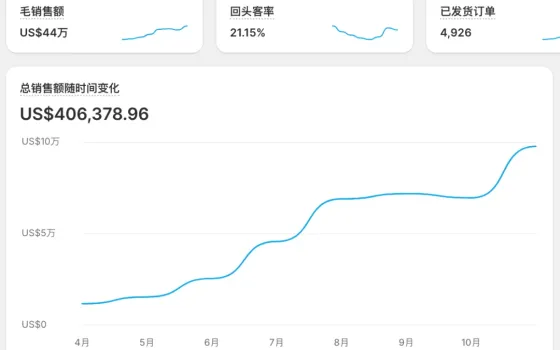
From $11,649 to $97,746 in 7 Months: A Full-Funnel Managed Operations Case Study of 739% Growth for Brand D's Independent Website
From $11,649 to $97,746 in 7 Months: A Full-Funnel Managed Operations Case Study of 739% Growth for …
How to Link a Bank Card and Withdraw Funds from Alibaba.com? Annual Fees for Alibaba.com
In the e-commerce sector, Alibaba Group is undoubtedly a leader. Among its platforms, Alibaba.com is…
How to Manage Operations on Alibaba.com? How to Train Alibaba.com Operations Professionals
With the rapid development of the internet, cross-border e-commerce has become a new engine for Chin…