 EN
ENWhat Are the Requirements for Amazon EU Responsible Person Labels? How Do You Print Them? Complete Hands-On Process and Tool Recommendations for 2026

Which seller on the European marketplace hasn’t had trouble with EU Responsible Person labels?


Your goods have already shipped, and then you suddenly receive an Amazon performance notification: "Your products are missing EU Responsible Person information. Please submit compliance documents within X days." You rush to get the details from your EU Responsible Person service provider, adjust the formatting in a Word template, and print it out—only to find that the street number is missing from the address, the label is only in English, and the product is so small that there’s nowhere to stick it... After several rounds of back and forth, your listing has already been taken down, while your goods are still sitting in an FBA warehouse.


Since the new GPSR rules took effect, EU Responsible Person labels are no longer something you can get away with by "just sticking on the name of an EU Responsible Person company." This article explains Amazon’s EU Responsible Person label requirements, the complete printing process, pitfalls to avoid, and how to choose the most efficient tool—all in one place.


🎁🎁Amazon EU Responsible Person Label Printing Tool:Use for 0 yuan and claim 3 ten thousand orders


I. First, Understand: What Exactly Is an Amazon EU Responsible Person Label?


1.1 An EU Responsible Person Is Not "One Organization" but "A Responsibility System"


Many sellers assume when they first enter the business that an EU Responsible Person is simply a matter of paying a few thousand yuan to find an EU company to lend its name. But that’s not how it works.


An EU Authorized Representative (EU Authorized Representative, abbreviated as EU AR) is essentially a legal contact located within the EU. When your products are sold in the EU and EU regulators, customs authorities, or consumers have an issue, there needs to be a "person" they can contact and hold responsible. If your company is in China and has no physical presence in the EU, you must appoint one.


But note: there is no single EU law officially called the "EU Responsible Person Law." Different product categories are subject to different regulations, and the responsible parties required are not always the same:

- Some products must appoint an "EU Authorized Representative"
- Some only require an "EU Responsible Person"
- Others are subject to an importer or designated responsible person system
So don’t take an intermediary’s word for it when they say, "Our EU Responsible Person service works for everything." It depends on what products you sell and which CE directive or GPSR applies.
1.2 Why Is the EU So Strict About This?
Put simply, there are three questions:
- Who should be contacted if a product causes a safety incident?
- Does the manufacturer really exist?
- Who will help provide the technical documentation?
Without an EU Responsible Person, EU regulators can’t find anyone to contact, and when something goes wrong, everyone can just pass the buck. Before the new GPSR rules, enforcement was somewhat more lenient; after GPSR became fully applicable on 2024 12 13, it made "what must be printed on the label" a strict requirement, and Amazon tightened its checks as well.
1.3 Which Amazon Sellers Need to Apply?
Simply put: most sellers offering non-food products on the EU and Northern Ireland marketplaces need to. This includes products bearing the CE mark, such as electronics, toys, cosmetics, and machinery.
The information you need to prepare and submit to Amazon includes:
- Manufacturer’s full name, postal address, email address, and telephone number
- EU Responsible Person information under GPSR
- Product safety warning images or documents
- CE and other compliance documents, where applicable
- Apply the corresponding label to the product or packaging
1.4 The Three Most Common Pitfalls in Amazon Inspections
After selling on the European marketplace for a while, you’ll find that sellers who get flagged usually trip up on these three things:
- Using false EU Responsible Person credentials →Choosing an unreliable provider to save money, only to find that the EU Responsible Person company has no record with EU regulatory authorities
- Using the same label across different marketplaces →A product sold on the German marketplace has only English warnings on its label, with no German, and is immediately flagged during a spot check
- The physical label does not match the information registered in Seller Central →The EU Responsible Person address entered in Seller Central is A, but the address on the product label is B. Amazon can spot the discrepancy immediately when it compares them.
II. Step by Step: How to Print Amazon EU Responsible Person Labels—Complete Process and Pitfalls to Avoid
2.1 Step One: First Confirm What Information Must Be Printed on the Label
Under the new GPSR rules, the information on an EU Responsible Person label is not optional; it is legally required. Missing even one item may result in a finding of non-compliance.
Here’s a checklist that Amazon sellers can use to check their labels item by item:
| Serial number | Required information | Common errors |
|---|---|---|
| 1 | Product identification: model, batch number, or serial number | Only the model is printed; without a batch number, the production batch cannot be traced if a problem occurs |
| 2 | Manufacturer name: full company name, registered trade name, or registered trademark | Only the brand name is printed; the legal entity name is not |
| 3 | Manufacturer’s full postal address | ⚠️Easiest to get wrong! Giving only the country name or printing only the website URL does not count; it must be a complete address where mail can be delivered |
| 4 | Manufacturer’s electronic address: email address or a specific contact page | New GPSR requirement! Packaging from before 2024 commonly lacks this item |
| 5 | EU responsible person’s name + full address + electronic address | Required when the manufacturer is not located within the EU |
| 6 | Importer information (if applicable) | If there is an EU importer in the supply chain, you cannot list only the EU representative |
| 7 | Safety warnings and instructions for use | Copying warning text from another company’s product does not meet the risk assessment requirements for your own product |
| 8 | Use the language of the country where the product is sold for the warnings | If you sell in Germany and print only English, you will definitely be flagged |
Key point: Item 3, “full postal address,” is a common cause of trouble. To save time, many sellers list only a country and city, or simply print a website link, but this does not comply with the GPSR. The complete postal address must include the street, building number, postal code, city, and country.
2.2 Step Two: Determine Where to Place the EU Representative Label
The priority for label placement depends on the size of the product. The regulations set out a clear hierarchy:
Product itself → Product packaging → Accompanying documents (instructions, insert card, packing list)
What does this mean? Put the label on the product if possible. If the product is too small, put it on the packaging; if the packaging is also too small, print it in the instructions. The obligation does not disappear because the product is small; it is simply transferred to the next level of carrier.
A few common examples:
- Products of ordinary size (e.g., Bluetooth earphones, small tools):Place the label directly on the back or bottom of the product
- Very small products (e.g., stud earrings, data cable connectors):Place the label on the retail packaging and also print a copy in the instructions
- Product sets:Each item sold separately must have its own label; one label for an entire set is not enough
2.3 Step Three: Create the Label Template
Once you have confirmed what to print and where to place it, the next step is to create the template. Here are a few practical points:
(1) What size should it be?
There are several common options for EU representative label sizes:
- 100 mm × 60 mm (most commonly used; suitable for a moderate amount of information)
- 70 mm × 50 mm (for small packaging)
- 50 mm × 30 mm (for very small products; keep the information concise)
The principle is that information must be clear and legible. Do not make the text so small to save space that older people cannot read it.
(2) Font and layout requirements
- Avoid overly decorative fonts. Sans-serif fonts such as Arial and Helvetica are the safest choice
- A minimum font size of 6 pt is recommended; the text should be easy to read with the naked eye when printed
- Do not use light gray for important information (such as the responsible person’s name and address); black is the safest choice
- Warnings should be in a language familiar to consumers; English alone is not enough
(3) Can a QR code replace text?
Amazon sellers often ask: Can I print a QR code so people can scan it to see all the information?
The answer is: digital labels can only be used as a supplement; they cannot replace legally required text information. In other words, you can add a QR code, but the 8 required information items listed above must be printed as text that is readable to the naked eye.
2.4 Step Four: Checklist Before Bulk Printing
Before printing EU representative labels, be sure to carry out a “three-point check” to help many Amazon sellers avoid 90% rework:
- Check 1: Compare against the information registered in Amazon Seller Central
- Check 2: Make sure different SKUs have not been mixed up
- Check 3: Print one sample first and check how it looks on the product
III. How to Choose an Amazon EU Representative Label Tool?
There are quite a few tools on the market for creating EU Representative labels. Let's go over the common types:
3.1 Free Online Label Generator Websites
Advantages:They're free and ready to use in a web browser, making it easy to quickly print one or two labels when needed.
The drawbacks are serious:
- Where is compliance data stored? There is no archiving feature, so if you switch computers, the template you created is gone.
- They can't be linked to store SKUs, so you have to enter the information manually every time.
- Has the EU Representative information been updated? You have to edit every template manually, one by one.
- Anyone printing labels in the warehouse can use them, creating a high risk of compliance information leaks.
- Shipping in large quantities? You'll be entering hundreds of SKUs manually until dawn.
Who it's suitable for: Small sellers just getting started, with a single store and single-digit monthly shipment volumes, who need a temporary solution.
3.2 Amazon Seller Central's Built-In Printing
Advantages:It's linked to shipments, so there's no need to find an additional tool.
Drawbacks:
- Very limited template flexibility, with few customizable fields.
- It generally doesn't support scenarios involving multiple SKUs and multiple EU Representative entities.
- Want to add a custom field? That feature isn't available.
Who it's suitable for:Sellers with a single store, a small amount of inventory, and a limited product range.
3.3 ERP-Integrated Label Tool (Recommended)
Once you're seriously operating in European marketplaces and your monthly shipment volume starts to grow, an ERP-level label tool is the way to go. When choosing one, focus on these key factors:
- ✅ Template customization capabilities: Can you add fields, adjust dimensions, and choose fonts yourself?
- ✅ Bulk import and export:Can you import information for hundreds of SKUs at once and print labels in bulk?
- ✅ Historical retention of compliance information: Can you track which label version was used for each shipment batch?
- ✅ Sub-account permission separation:Can warehouse staff who print labels see only the ASINs they need to print, without access to all your compliance information?
- ✅ Integration with the FBA shipment workflow:Can labels be printed directly from the shipping workflow with information synced automatically, without copying and pasting across systems?
IV. How Can Amazon Sellers Print EU Representative Labels Efficiently?
By now, many Amazon sellers have probably realized that printing EU Representative labels takes up half a day each time and often leads to mistakes. The most common complaints are these pain points:
- 😩 Pain point 1: Hundreds of SKUs, each product with different EU Representative information, and creating templates manually is driving you crazy.
- 😩 Pain point 2: The EU Representative company has changed several times, but the warehouse is still applying old labels. You only find out when Amazon checks.
- 😩 Pain point 3: Warehouse colleagues who print labels can see all compliance information, creating a high risk of information leaks.
- 😩 Pain point 4: When shipping through FBA, you have to print the outer carton labels, FNSKU labels, and EU Representative labels separately, switching between systems each time.
- 😩 Pain point 5: One letter is printed incorrectly on a label, and you only discover it after labeling the entire batch. The labels won't even peel off.
These issues can actually be resolved with a single ERP tool. That's why we recommend that Amazon sellers use Saihu ERP to print EU Representative labels with ease.
4.1 Feature One: Built-In EU Representative Label Templates, Ready to Use
You no longer need to adjust the formatting yourself in Word.
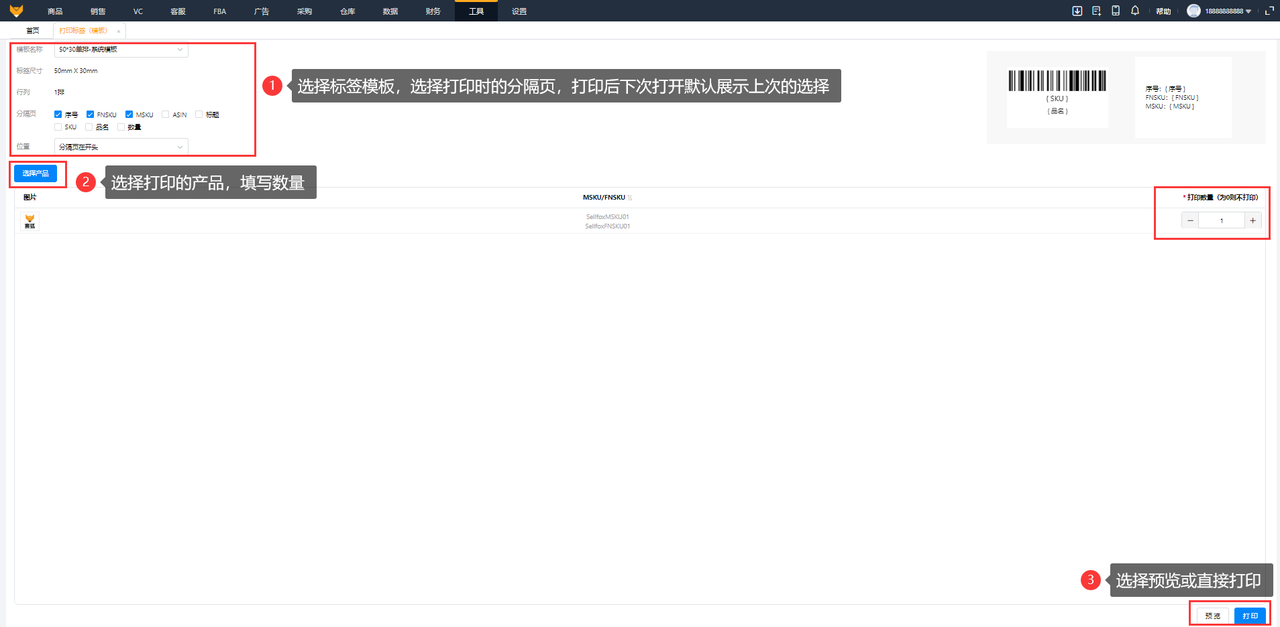
Saihu has a built-in label printing tool. Sellers can customize templates or select an EU Representative label template, then import a product list to print labels in bulk.
The print settings automatically remember the paper specifications and label dimensions you selected last time, so you can use them directly the next time you open the tool without adjusting them again.
4.2 Feature Two: Link Compliance Information by SKU to Avoid Mix-Ups
This feature saves the most time.
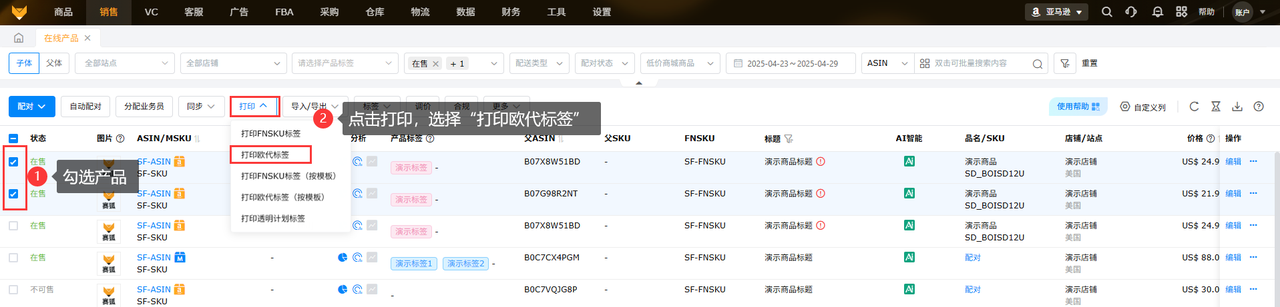
Sellers can link EU Representative information, manufacturer information, and other compliance data across multiple dimensions: by store, SPU, SKU, and MSKU.
Amazon sellers can enter and save each product's corresponding EU Representative company, manufacturer's address, certification documents, and other information in the system all at once. The next time they print, the system automatically matches the corresponding compliance information by SKU, so there's no need to enter it manually each time.
A product can also be linked to multiple label versions, with different versions used for different batches, and the history is searchable. The system supports bulk import of compliance information, so you can import data for hundreds of SKUs in one go using Excel.
4.3 Feature Three: Print with One Click from FBA Shipments Without Interrupting the Shipping Workflow
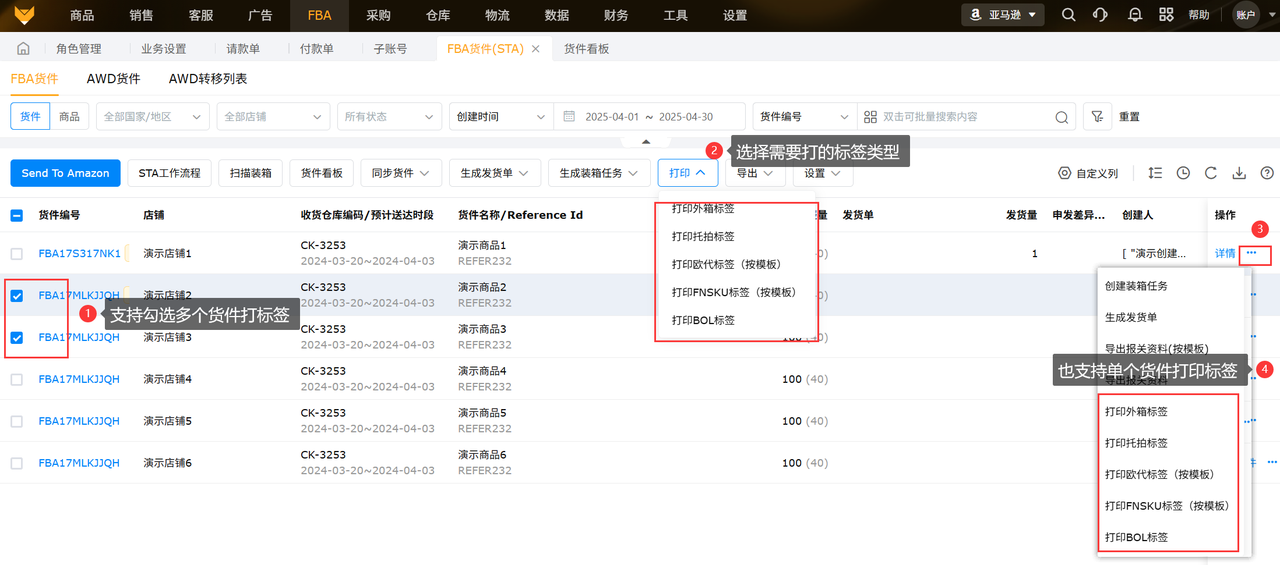
Previously, shipping worked like this: first, print the outer carton label in Seller Central → then open another tool to print the EU representative label → then go back to print the FNSKU label... Switching back and forth between three systems left the warehouse staff overwhelmed.
Saihu has integrated EU representative label printing directly into the FBA shipment workflow:
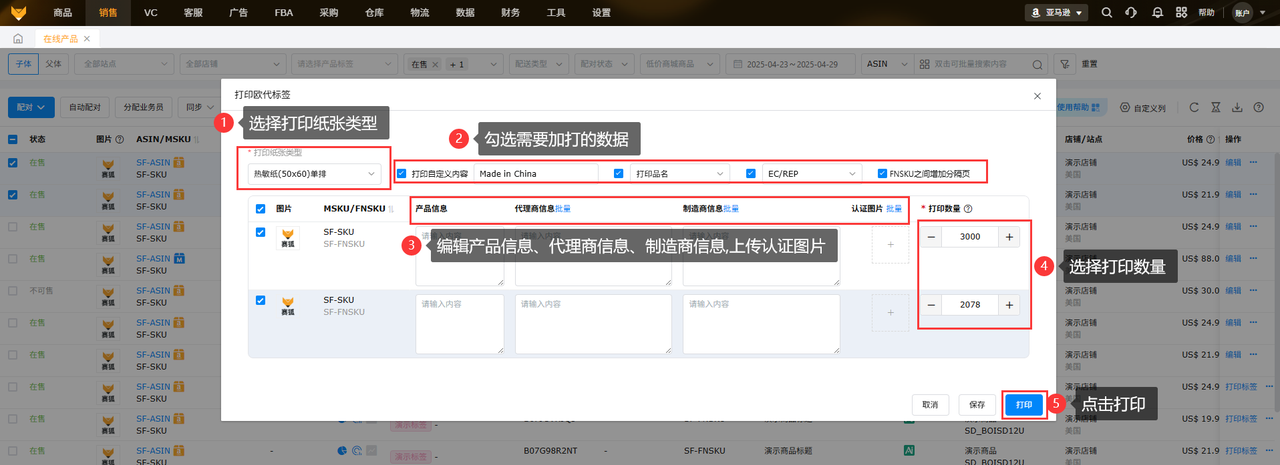
- Amazon sellers can edit product information, representative information, and manufacturer information directly when creating an FBA shipment
- Upload the corresponding certification documents
- Select the paper size and check the fields you want to print
- Print outer carton labels, FNSKU labels, and EU representative labels all at once
The entire process takes place without leaving the shipment page, making warehouse label-printing at least twice as efficient.
V. Frequently Asked Questions About Amazon EU Representative Labels
Q1: What if the product and its packaging are both too small?
A1:Follow these steps in order of priority. If the product itself is too small for a label → put it on the packaging; if the packaging is also too small → print it on accompanying documents such as the instruction manual, warranty card, or packing list. The obligation does not disappear; it is simply transferred to another medium. However, you must ensure that the accompanying documents actually reach the consumer with the product.
Q2: If I sell the same product on marketplaces in different countries, do I need to print labels in several languages?
A2:Yes. Use the language of the country where the product is sold for warnings and safety information. You can make a multilingual label or print separate versions in the relevant languages for each marketplace.
Q3: What should I do with inventory in the warehouse that has already been labeled if the EU representative information has been updated?
A3:We recommend switching as soon as possible. If the inventory is small, we recommend relabeling it. If the quantity is large, assess the risk of a spot inspection—but remember that if outdated EU representative information is found, the consequences will cost far more than relabeling.
At the end of the day, an EU representative label may look like “just printing a sticker,” but it is actually a crucial part of the GPSR compliance framework. An incorrectly labeled product may, at best, have its Listing taken down; at worst, an entire shipment may be detained. The loss can be far greater than the cost of reprinting labels.
Understanding Amazon's EU representative label requirements, choosing a user-friendly tool, and standardizing the bulk-printing process are the right ways for European marketplace sellers to operate reliably.
If EU representative labels are causing trouble for your European marketplace business, why not try Saihu ERP's label-printing feature and use the time saved to list two more products?
Product link1:Free cross-border e-commerce ERP registration
Product link2:Claim 36000 orders for free, with no minimum requirements
Customer service3:Real-time support for cross-border e-commerce ERP, free of charge
*Disclaimer: Some images, text, and other materials on this website are sourced from the internet and are provided for communication and learning purposes only. If you believe any content infringes your rights, please contact us by private message and we will remove it as soon as possible. No organization or individual may reproduce, excerpt, adapt, or otherwise use the content of this website without authorization.
Source: Original website · Read the original
Related Learning

Financing solutions for Amazon sellers
Financing solutions for Amazon sellers Financing solutions are crucial when it comes to scaling your…

Asia–Europe Freight Rates Fall for 13 Consecutive Weeks as US and European Routes Weaken Across the Board
AMZ123 has learned that the latest assessment of Drewry's World Container Index shows freight r…

Amazon Plans to Acquire AI Startup Decart for 70 Hundred Million US Dollars
AMZ123 has learned that, according to a recent report by The Wall Street Journal, Amazon is in acqui…