 EN
ENHow Should You Prepare for Amazon's Peak Season? The Essential Full-Cycle Guide to Avoiding Pitfalls for Sellers in Q4 of 2026!

Every year, Q4 is the most critical battle of the year for Amazon sellers.


Have you experienced a peak season like this—


Starting your Amazon peak-season preparations early, only to struggle to distinguish the traffic patterns of different overseas holidays? Blindly stocking up across different marketplaces at the same time, only to end up with stockouts in some and excess inventory in others? Spending heavily on advertising, only to find that ACOS has skyrocketed beyond comprehension when Black Friday and Cyber Monday finally arrive?


Sellers who have encountered these pitfalls know that managing Amazon's peak season is never just about scrambling at the last minute for those two days, Black Friday and Cyber Monday.


Truly preparing for Amazon's peak season means following the complete holiday cycle of Q4—understanding the consumption characteristics of different marketplaces, implementing standardized SOPs in stages, and getting the timing right step by step.


This article starts by mapping out the key peak-season dates in Q4, then breaks down the core strategies and practical workflows for peak-season operations to help you confidently capitalize on Amazon's Black Friday and Cyber Monday traffic surge!


🎁🎁Tools to Support Your Amazon Q4 Preparations:Use for 0 yuan and receive 3 ten-thousand orders


One. Which Holidays Are Included in Amazon's Q4 Peak Season? How Should You Prepare?


Many beginners think the Q4 peak season consists only of Black Friday and Cyber Monday. In fact, it also includes Christmas, Halloween, and other holidays, making it one of the most lucrative sales periods of the year. Moreover, this year's peak season has one key difference from previous years: warehouse receiving deadlines across platforms are a full two weeks earlier than in the past five years.


Time is tighter, costs are higher, and competition is fiercer, but platform subsidies are also more substantial. Amazon sellers therefore need to understand that peak-season preparation follows a complete sequence: warm-up → surge → wrap-up. Traffic characteristics, suitable categories, and operational priorities differ at each milestone.


The table below summarizes the essential peak-season milestones for Amazon sellers, helping you allocate budgets and schedule inventory preparation precisely, without wasted effort or resources.

| Peak-Season Milestone | Time Period | Traffic Characteristics | Key Suitable Categories | Marketplace Sellers Who Should Pay Particular Attention | Seller Operational Priorities |
| Halloween | Month 10, day 31 | Peak-season warm-up, niche traffic | Decorations, apparel, props, home goods | Primarily the US and Canadian marketplaces; a limited presence can be established in European marketplaces | Test the waters with small orders, clear slow-moving inventory of lightweight niche products, and build keyword ranking weight |
| Thanksgiving | Month 11, day 26 | Broad consumer warm-up, growing traffic | Kitchenware, home goods, gifts, everyday essentials | The US marketplace is the core focus; follow up concurrently in Canada, and lay the groundwork for the warm-up in European marketplaces | Boost Listing rankings, start advertising to build momentum, and submit early promotions |
| Black Friday | Month 11, day 27 | Annual traffic peak, a surge across all categories | Strong sales across all categories | The US, the five European country marketplaces, and Canada; sellers in these marketplaces must prioritize preparations | Capture homepage traffic, scale up orders, strictly control discounts and ACOS, and monitor performance for real-time optimization |
| Cyber Monday | Month 11, day 30 | Peak online traffic, a window for additional orders | 3C, home goods, beauty, apparel | Traffic is strongest in the US marketplace; online orders surge in European and Canadian marketplaces, with a focus on online conversion | Carry forward Black Friday momentum, make a final push for additional order volume, and clear moderate inventory levels |
| Christmas/New Year | Month 12, day 25–early month 1 of the following year | Maintain residual momentum, wrap up with inventory clearance | Holiday gifts, ornaments, home goods | The US, the five European country marketplaces, and the UK; step up New Year efforts concurrently in Japan | Maintain steady orders, handle after-sales service, clear remaining stock, take inventory, and review performance |
Essential reminder: FBA warehouse receiving deadlines and promotion submission windows for Black Friday and Cyber Monday are fixed. Missing them means losing eligibility for major promotions outright. Be sure to allow buffer time for ocean/air freight, inspections, and making products available for sale. Do not wait until the last day to ship!
Two. Amazon Q4 Peak-Season Preparation SOP: Follow These Four Stages
This section contains the article's most practical, actionable content. It is broken down into four stages: advance preparation → warm-up and momentum building → major promotion surge → wrap-up and review. What to do, which tools to use, and which pain points to address at each stage are all laid out clearly, so you can follow the steps directly.
Stage One: Advance Preparation Period (mid-month 10)
Key actions:
1. Review SKUs and calculate peak-season stocking quantities
2. Calculate per-product costs and gross profit
3. Apply for FBA storage capacity and arrange inbound logistics:
- Walmart's inbound cutoff is month 10, day 1 (the earliest across all platforms; sellers operating on both Amazon and Walmart should take note)
- Amazon AWD satellite warehouses: month 10, day 14; single-location inbound placement: month 10, day 21; optimized split inbound placement: month 10, day 28 (the main inventory cutoff for most sellers)
Pay attention to one detail: Amazon's peak-season surcharge officially takes effect on month 10, day 15, while month 10, day 28 is the inbound deadline for most sellers. The two dates are only 13 days apart. This means that Amazon sellers' inbound deadline—the two dates are only 13 days apart—means your goods must arrive at the warehouse before day 28, while you should also aim to complete most inbound receiving before day 15 to avoid higher peak-season fees.
You can ship in batches according to SKU priority: send core bestsellers first, followed by replenishment for long-tail products, and use air freight for urgent replenishment.
4. Fix and optimize basic Listings
5. Stockpile creative assets, test ads, and determine advertising priorities
- Small-budget ad testing: Set 2-3 variables (themes, content formats, visual styles, calls to action, etc.) and run ads with a small budget for 7-14 days to test holiday marketing content directions, audiences, offer messaging, and more. Evaluate performance based on video completion rates, engagement rates, clicks, and initial conversion signals. Strong-performing directions can become the main focus for Q4.
- Build a creative asset library:Prepare image/video assets in advance around themes such as product close-ups, usage scenarios, before-and-after comparisons, and unboxing reviews, ensuring compatibility with multiple dimensions.
The most common pitfalls at this stage: guessing stocking quantities based on historical sales, leading to bestsellers going out of stock during major promotions and long-tail products sitting in warehouses until Q2 of the following year; procurement costs, first-leg shipping costs, advertising expenses, and platform fees are scattered across different backends, making it impossible to determine before peak season which SKUs truly make money and which represent "false prosperity."
At this point, Amazon sellers are advised to use Sellfox ERP, an SPN service provider listed on Amazon's official website, to improve efficiency across the board for the peak-season battle!
Sellfox solution → Operating steps:
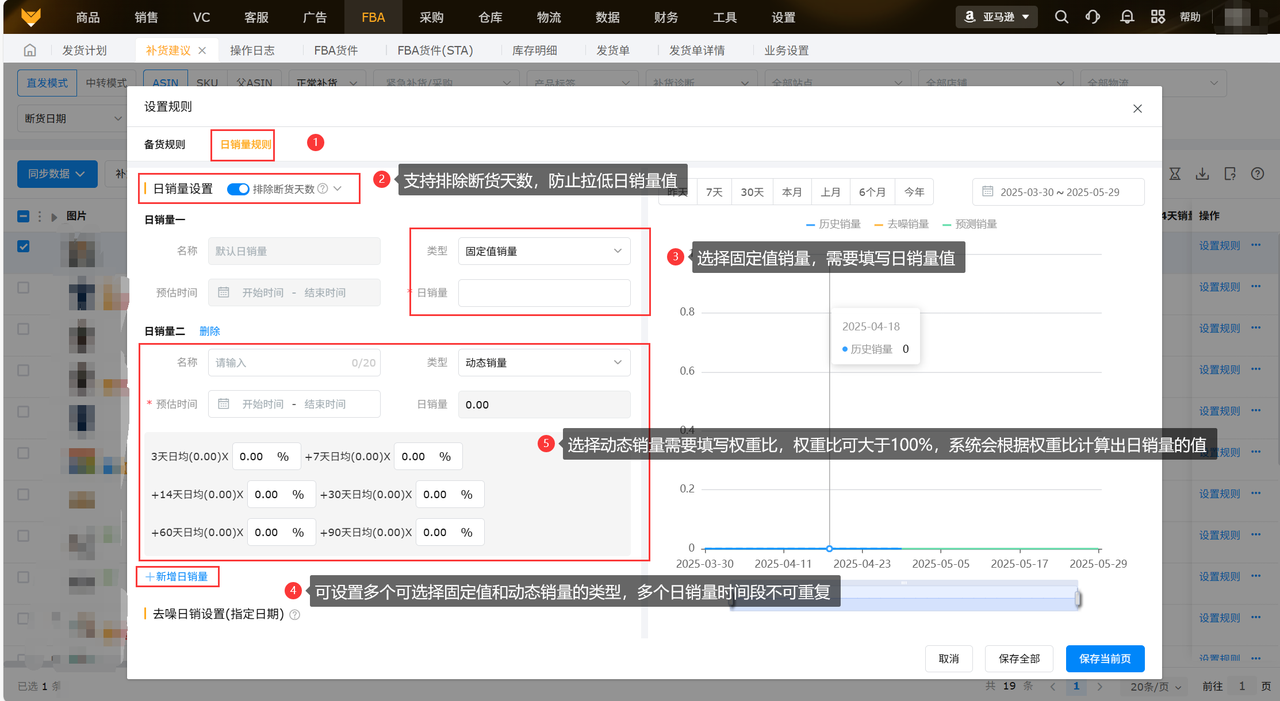
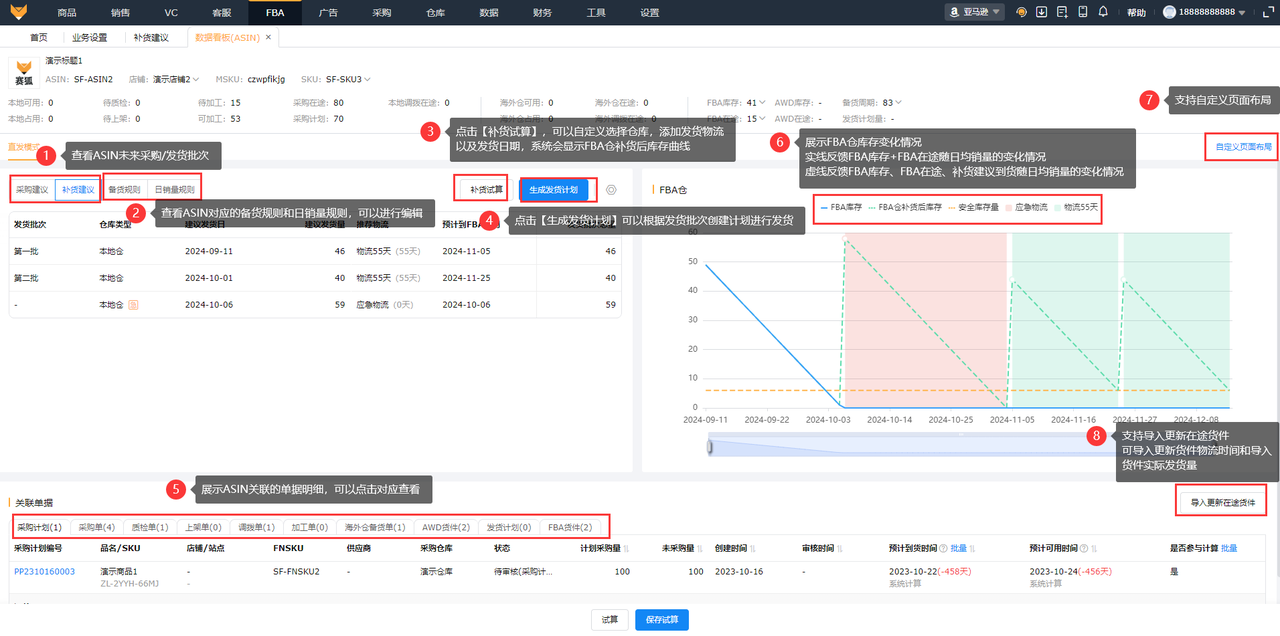
① Smart replenishment recommendations—calculate Black Friday and Cyber Monday stocking quantities with one click
Navigation: [FBA] → [Replenishment Recommendations]
- Step one: First complete the basic configuration under [Settings] → [Business Settings] → [Replenishment Recommendations]—set the replenishment mode (direct shipping/transshipment), recommended quantity configuration, holiday settings, inventory configuration, default rules, out-of-stock periods, and more;
- Step two: Open the replenishment recommendations page and view the system's automatically calculated data by ASIN, including "Recommended Replenishment Quantity," "Recommended Purchase Quantity," "Recommended Shipping Date," and "Out-of-Stock Date";
- Step three: For the Q4 peak season, open an individual ASIN's "Set Rules" → "Daily Sales Rules," set the major promotion period to "Dynamic Sales," and increase the weighting for the most recent 7 days/14 days. Alternatively, use "Historical Sales" mode to import last year's Black Friday and Cyber Monday sales ratios so the system incorporates the promotional sales spike into its forecast;
- Step four: Use the "Replenishment Simulation" feature to customize shipping dates and replenishment quantities, and preview the FBA inventory curve on the right to see whether stockouts will occur;
- Step five: Click "Adjust Shipping Date" for core bestsellers to ship them earlier, and set long-tail products to "Do Not Replenish for Now" to avoid a one-size-fits-all approach.
② Profit reports—identify high-profit priority SKUs before peak season
Navigation: [Finance] → [Profit Reports]
- Step one: After you authorize access to your Amazon store, the system automatically retrieves settlement data through the API, eliminating the need to download reports manually;
- Step two: Switch to [MSKU View] or [ASIN View], select the most recent 30 days, and sort by "Gross Profit" in descending order to identify the Top 20 high-profit SKUs as your priority products for Q4;
- Step three: Click anomalous figures and use [Resolve Exceptions] to fill in missing procurement costs and first-leg shipping expenses (use [Batch Costs] for FBA orders; for FBM orders, you can use "Enter Expenses" in the order details);
- Step four: Use the contribution analysis bubble chart in the "Profit Dashboard" to cross-analyze categories such as advertising spend, storage fees, and product costs, identifying SKUs that "sell well but do not make money" in advance.
Phase two: Warm-up and buzz-building period (mid-month 10 to mid-month 11)
Key actions:
1. Submit applications for official Black Friday and Cyber Monday events by marketplace
2026 Amazon Black Friday and Cyber Monday promotion submission window dates:
- US marketplace: month 7, day 8 to month 10, day 20
- Canada marketplace: month 7, day 8 to month 11, day 13
- Europe marketplaces: month 7, day 6 to month 11, day 18
- During the warm-up period, try allocating a small amount of ad spend to shallow conversion objectives such as engagement and jiagou [uncertain term], reaching potential users early and building a customer list
- Allocate budgets based on competing product trends and prepare your Q4 plan in advance
4. Check all risks of overlapping promotions
5. Other actions
- Secure influencers and KOLs 4-6 weeks in advance to produce holiday lists, trend-based product recommendations, unboxing reviews, before-and-after comparisons, and other content
- Focus on scenario-based, emotionally engaging content, integrating products into holiday scenarios
- Update the official website homepage, social media banners, and other materials with holiday themes
The most common pitfalls at this stage: checking keyword rankings by manually searching Amazon's storefront one keyword at a time takes most of the day, and you only realize competitors have displaced your keywords after the fact; running Lightning Deals, coupons, Prime-exclusive discounts, and Manage Promotions simultaneously can bring the discounted price close to 0 yuan after multiple rounds of stacking, resulting in orders sold at a loss on the major sale day.
Saihu solution → Operating steps:
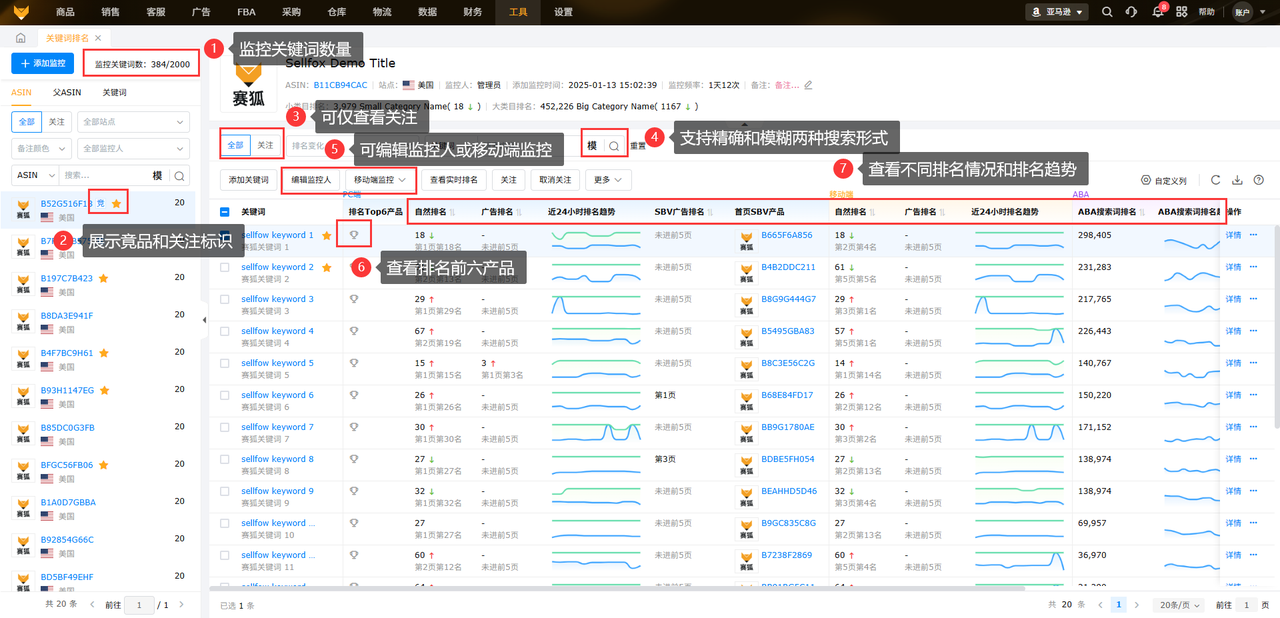
① Keyword ranking monitoring—automatically updated every 2 hours, with ranking fluctuations visible at a glance
Navigation: [Tools] → [Keyword Rankings]
- Step one: After entering the page, switch between ASIN, parent ASIN, and keyword views, then use "Add Monitoring" to enter the core and long-tail keywords you plan to target in Q4;
- Step two: The list directly displays each keyword's "Organic Rank (PC)", "Ad Rank (PC)", "Organic Rank (Mobile)", and "Ad Rank (Mobile)", along with a ranking trend line chart for the past 24 hours, making rises and falls clear at a glance;
- Step three: To see real-time results, click "View Real-Time Rankings" on the right. With the Saihu extension installed, you can obtain the latest ranking positions within seconds after adjusting prices or increasing budgets; (For the Saihu extension download tutorial, click to view the Help Center)
- Step four: Use the ABA search term ranking field to determine whether ranking fluctuations result from your own operational actions or changes in overall search volume, avoiding misjudgments;
- Step five: You can also add competitor ASINs for side-by-side comparisons. Promptly increase budgets for keywords where competitors' rankings are rising to compete for positions.
For detailed instructions on using the Amazon keyword ranking feature, click to view the Saihu ERP Help Center
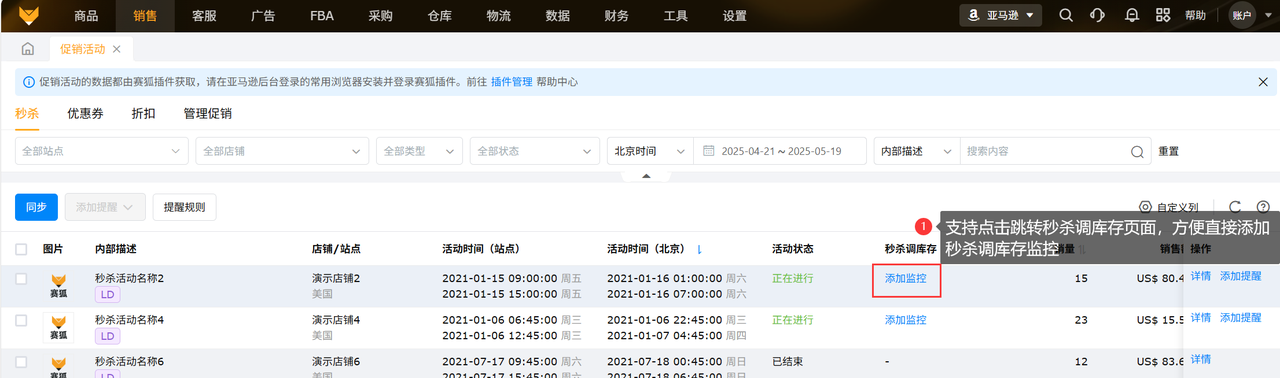
② Centralized promotion management—automatically identifies stacked discounts to prevent purchases at 0 yuan at the source
Navigation: [Sales] → [Promotions]
- Step one: Install and log in to the Saihu extension in the browser you normally use to access Amazon's backend, and keep the extension online (the system automatically synchronizes daily at 8, 13, and 17 o'clock; manual synchronization is also available);
- Step two: The page centrally displays the products, statuses, prices, discounted prices, and start and end times for four types of promotions: Lightning Deals, coupons, discounts, and Manage Promotions. There is no need to check each promotion individually in Amazon's backend;
- Step three: Enable the "Discount Alerts" toggle in [Message Settings]. When the system detects an abnormal discounted price caused by multiple promotions stacking on the same product, it proactively sends an alert;
- Step four: Before the major sale, add "Before Start/Before End Reminders" to key promotions to avoid forgetting to start or end them;
- Step five: Coupons can be created and canceled directly in Saihu, and their change logs can also be viewed there, without switching back and forth between backends.
Stage three: Holiday sales surge sprint (Black Friday and Cyber Monday at the end of month 11–Christmas in month 12)
Core actions:
1. Monitor sales data across multiple marketplaces and stores in real time
2. Adjust advertising bids and budgets by time slot to capture prime marketing opportunities
- Black Friday and Cyber Monday: Peak conversions; concentrate budgets on best-selling products
- Christmas: A smaller conversion-rate peak. Categories not constrained by logistics have a greater advantage; focus on the "last-minute gift" scenario.
- 3. Track changes in prices, rankings, and inventory
- 4. Process orders and after-sales requests rapidly
The most common pitfalls at this stage: on Black Friday, sales surge simultaneously across marketplaces in the United States, Europe, and Japan. Manually switching between different backends leaves order, sales, and advertising data lagging by one or two hours. By the time you discover which products have surged or which ads have burned through their budgets, half the budget has already been spent; advertising bids remain unchanged for 24 hours, so money is still spent during the early-morning lull, while there is no budget left to capture volume during peak periods.
Saihu solution → Operating steps:
① Homepage BOSS Operations Dashboard—the command screen for the major sale day
Navigation: Saihu system homepage
- Step one: Switch countries, stores, and currencies in the global search bar at the top, and select all the marketplace stores you need to monitor on Black Friday in one go;
- Step two: The "Haimai Assistant" module displays today's sales revenue, order count, units sold, and average product price for the selected stores in real time. Data comes from [Orders] → [All Orders–Amazon] and refreshes in near real time;
- Step three: The "Advertising Updates" module directly displays real-time advertising spend at the store level. Click to open "Advertising Panorama" for analysis with the relevant filters applied;
- Step four: The "To-Do Items" module aggregates workflow bottlenecks such as replenishment awaiting allocation, FBM orders awaiting shipment, and buyer messages awaiting replies, so there is no need to search everywhere for exceptions on the major sale day;
- Step five: The "Sales Rankings" update the Top50 in real time by sales volume/sales revenue/profit. Click a breakout product to go directly to its sales and profit details, without manually creating spreadsheets;
- Step six: Add up to 5 time zone clocks to the homepage (U.S. Eastern, U.S. Pacific, Europe, Japan, etc.), so you do not have to convert major promotion start times yourself.
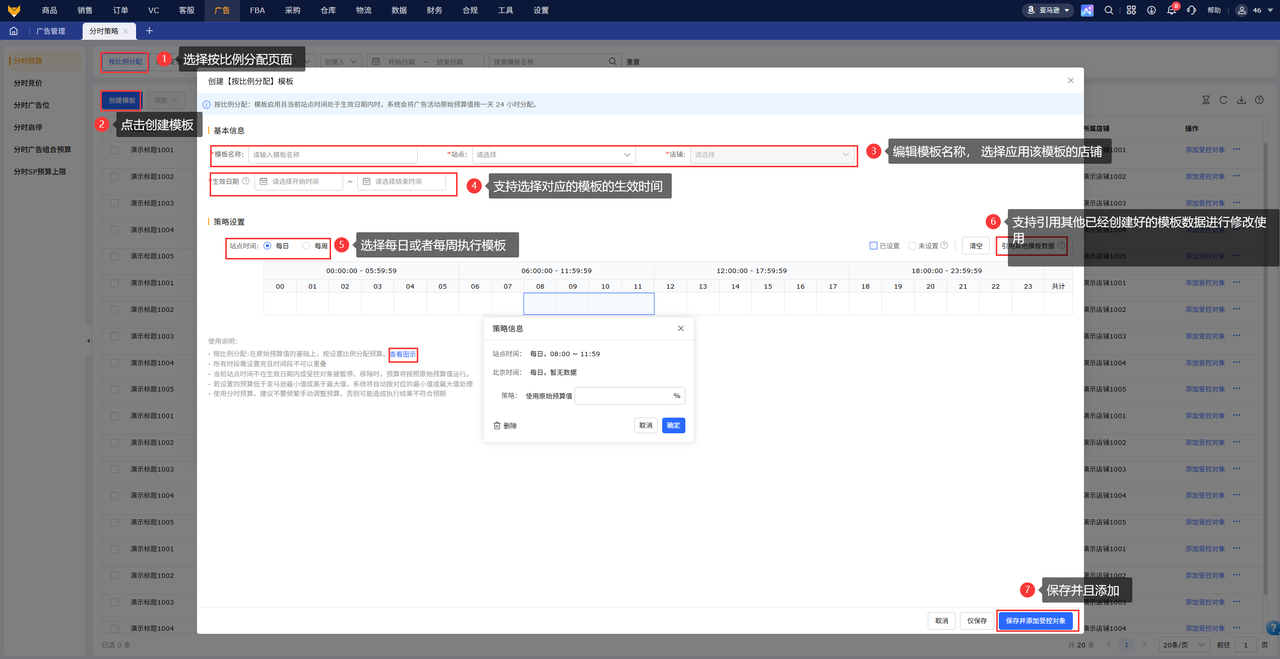
② Ad Dayparting Strategies—Automatically Adjust Bids and Budgets During Peak and Off-Peak Hours
Navigation: [Advertising] → [Dayparting Strategies]
- Step one: Create templates before the major promotion, categorized as "Time-Based Budgets," "Time-Based Bidding," "Time-Based Placements," "Time-Based Start/Stop," "Time-Based Portfolio Budgets," and "Time-Based SP Budget Shangxian" (uncertain source term), to run according to daily or weekly rules;
- Step two: Taking Black Friday as an example—reduce the SP budget during the off-peak U.S. hours of 0:00-8:00 to 20% of its normal level and lower bids; during the peak conversion hours of 8:00-23:00, maximize the budget and raise bids, and even enable time-based placements to increase the top-of-search placement percentage;
- Step three: After saving the template, batch-select the corresponding campaigns under "Controlled Objects." Batch activation and batch adjustment of restore values are supported;
- Step four: Once enabled, the system automatically switches settings according to the schedule, so you do not have to get up in the middle of the night to adjust budgets manually; modify restore values (original budgets/bids) under [Ad Management] → "Ad Strategy" for the corresponding ad, avoiding frequent manual intervention in Amazon's backend;
- Step five: Use [Time-Based SP Budget Caps] alongside this to further control hourly budget ceilings and prevent the entire day's budget from being exhausted in just one or two hours.
Phase four: Ongoing Maintenance Period (end of month 12-early month 1 of the following year, "Q5")
Core actions:
1. Inventory checks and leftover stock planning by store/marketplace
2. Comprehensive review of advertising, sales volume, and profit
3. Consolidation and optimization of problematic SKUs
4. Build an annual peak-season data model and use remarketing to turn Q5 into a second growth window
- Continue brand promotion and remarket to users who did not complete their purchases during the major promotion, encouraging existing user retention and new user acquisition
- Redistribute influencer videos, editing and reusing them as ad creatives to reduce creative production costs and extend the content lifecycle
The most common pitfall at this stage: pulling out as soon as the major promotion ends. Sales, advertising, inventory, and profit data are scattered across Amazon's backend, the advertising backend, ERP, and Excel, making it impossible to piece together a complete profit picture by marketplace and SKU during the review. Which products were overstocked, which ads had soaring ACoS, and which promotions lost money are all judged from memory, leading to the same mistakes again in Q4 next year.
Saihu Solution → Operating Steps:
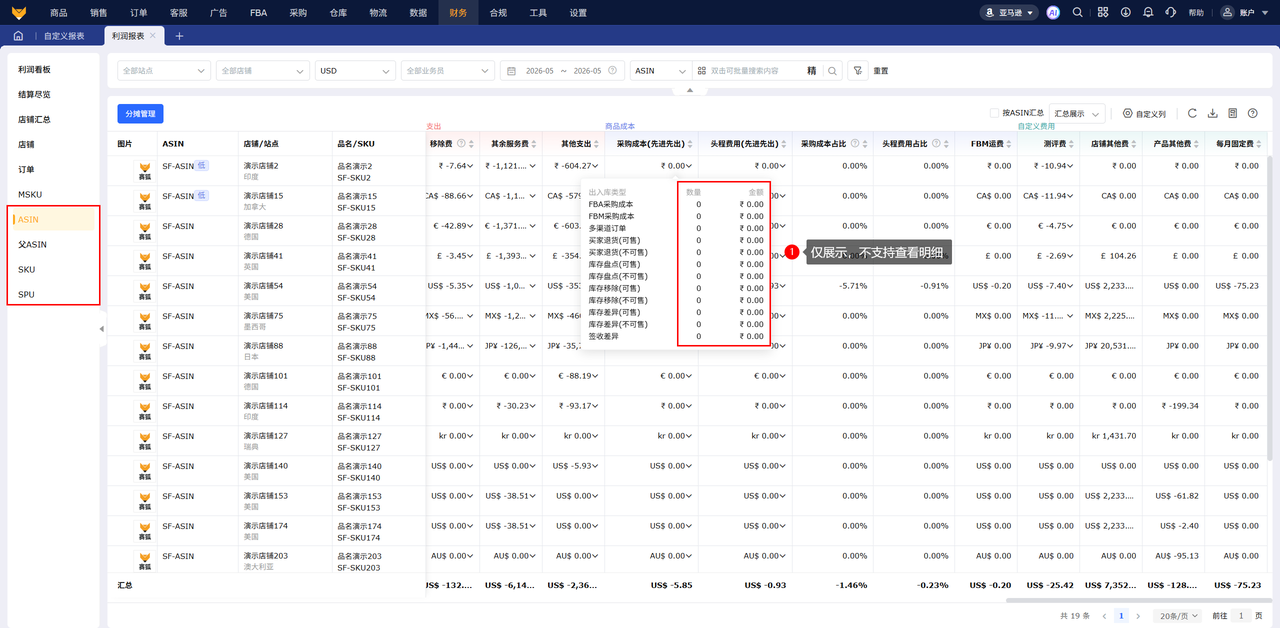
① Profit Reports—Account for Every Amount in Q4
Navigation: [Finance] → [Profit Reports]
- Step one: After day 5 of each month, when Amazon API data has stabilized, switch to the "Store Summary" view to compare overall revenue, expenses, gross profit, and year-over-year/period-over-period changes for Black Friday week, Cyber Monday week, and Christmas week;
- Step two: Switch to [MSKU View]/[ASIN View], sort by gross profit in descending order, and export to directly create a "Q4 High-Profit Bestsellers Ranking" and a "Q4 Loss-Making Slow Movers Ranking" as the basis for next year's inventory planning and product discontinuation decisions;
- Step three: Use "Thematic Analysis" to examine the respective shares of advertising spend, promotional discounts, and storage fees in Q4, identifying whether advertising costs or storage fees exceeded expectations;
- Step four: Click into anomalous items to resolve outstanding missing-cost issues and avoid overstating profit data for month 12;
- Step five: Use "Custom Export" to export and archive profit reports by marketplace, store, and SKU as supporting evidence for next year's peak-season budget request.
② Sales Insights + Replenishment Recommendations—Turn Peak-Season Experience into Next Year's Algorithm
Navigation: [Data] → [Sales Insights]; [Orders] → [Replenishment Recommendations]
- Step one: Select the Black Friday and Cyber Monday period in the "Analysis Overview" of Sales Insights, review sales volume fluctuations by marketplace/store, and use "Market Analysis" to examine changes in search term rankings and determine which terms represent short-lived Q4 spikes and which are long-term growth terms;
- Step two: Return to [Replenishment Recommendations] → Historical Sales Analysis, and use this year's Q4 sales curve as the reference baseline for next year's "Historical Sales" mode;
- Step three: Identify the ASINs that went out of stock this year and increase the forecasting weight for the major promotion period in "Daily Sales Rules," so the system will issue replenishment reminders earlier next year;
- Step four: Tag long-tail ASINs that remained overstocked into Q5 this year as "Do Not Replenish for Now" to avoid stocking them again during next year's peak season;
- Step five: All accumulated rules, weights, and tags will be saved in the system for direct reuse in Q4 next year, without having to start from scratch.
Ultimately, the key to preparing for Amazon's peak season has never been a last-minute sprint on the day of a major promotion—it is about planning ahead around the Q4 holiday calendar, understanding the differences between marketplaces, and using standardized SOPs to execute every step thoroughly.
Amazon Black Friday and Cyber Monday, as the biggest sales surge of the year, put sellers' inventory, promotions, advertising, and risk management capabilities to a major test.
Relying on traditional manual operations means low efficiency, significant errors, and high risks. Digital tools are essential leverage for truly preparing for Amazon's peak season and maximizing the effectiveness of peak-season operations on Amazon.
With a standardized, phased approach + the intelligent tools of Saihu ERP, common peak-season pitfalls can be avoided in advance, helping sellers securely capture orders and profits during Black Friday and Cyber Monday.
Product link 1:Free registration portal for cross-border e-commerce ERP
Product link 2:Claim 36000 orders for free with no eligibility requirements
Human customer support 3:Free real-time Q&A for cross-border e-commerce ERP
*Disclaimer: Some images, text, and materials on this site are sourced from the internet and are intended solely for discussion and learning. If any content infringes your rights, please contact us by private message, and we will promptly address it and remove the content. Without authorization from this site, no organization or individual may reproduce, excerpt, adapt, or otherwise use this site's content.
Source: Original website · Read the original article
Related Learning
AliExpress · Featured
AliExpress Local Store Shipping Rules? AliExpress Official Website Entry
With the rapid growth of cross-border e-commerce, more and more merchants are choosing to join the A…
Cross-border Ecommerce · Featured
From Losses to Profit: How User Experience Helped a DTC Store Achieve an ROI of Over 4 Within 3 Months | Shenzhen Topu Customer Case
A DTC store is not an advertising machine; it is a business built around user experience. I. Introdu…
AliExpress · Featured
How to Operate a Local AliExpress Store? AliExpress Store Registration Process
In cross-border e-commerce, AliExpress, as China’s largest online B2C foreign trade platform, has at…